
If you’re looking for an IPTV player designed specifically for Smart TVs, you’ve probably come across IBO Player. It’s one of the most popular IPTV applications for Samsung and LG TVs, offering an easy way to stream live TV, movies, and series using your own IPTV subscription.
In this IBO Player Review, we’ll explain what the app is, how much it costs, how to activate it, how to set it up on different devices, and whether it’s worth buying.
Note: IBO Player is only an IPTV player. It does not include TV channels, movies, or an IPTV subscription.
What Is IBO Player App?
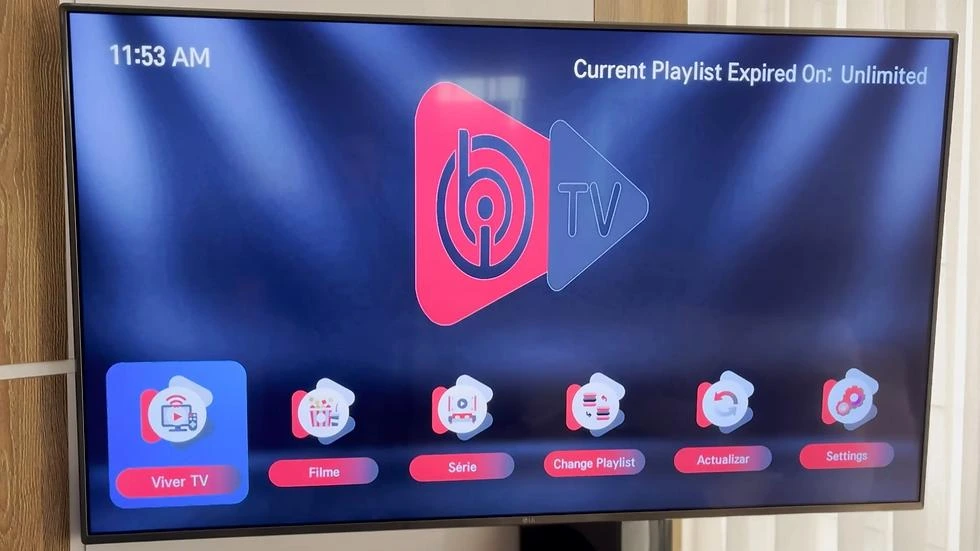
IBO Player is an IPTV media player that allows users to stream content from their IPTV provider using:
- M3U Playlist URL
- Xtream Codes API
It is especially popular on:
- Samsung Smart TVs (Tizen)
- LG Smart TVs (WebOS)
- Android TV
- Firestick
- Android Boxes
The application provides a modern interface, fast performance, and excellent compatibility with Smart TVs.
IBO Player Features
IBO Player offers several useful features for IPTV users.
Main Features
- Live TV streaming
- Movies & Series support
- Electronic Program Guide (EPG)
- Xtream Codes login
- M3U Playlist support
- Favorites management
- Multi-language interface
- Fast channel switching
- External subtitle support
- User-friendly Smart TV interface
IBO Player Performance Review
IBO Player performs smoothly on supported devices.
Performance Highlights
- Fast startup
- Smooth HD and 4K playback
- Stable navigation
- Quick playlist loading
- Responsive interface
- Optimized for Smart TVs
Overall performance depends on your IPTV provider and internet connection.
Performance Rating: ⭐⭐⭐⭐⭐ (4.8/5)
How Much Does IBO Player Cost?
One of the most searched questions is:
IBO Player Cost
IBO Player typically offers a free trial period, after which users must purchase an activation license to continue using the app.
IBO Player Lifetime License
Many users choose the lifetime activation, which is a one-time payment tied to the device’s MAC address.
Pricing may change over time, so always check the official IBO Player website for the latest activation cost.
IBO Player Activation
To use IBO Player after the trial period, you must activate the app.
The activation process uses your TV’s MAC Address and Device ID.
After activation, your device is permanently linked to your purchased license.
IBO Player Login
Unlike some IPTV apps, IBO Player does not require creating a traditional user account.
Instead, users:
- Install the app
- Note the Device ID and MAC Address
- Upload their IPTV playlist through the activation portal
- Start streaming
How to Setup IBO Player
Setting up IBO Player is simple.
Step 1
Install IBO Player on your Smart TV or streaming device.
Step 2
Open the app.
Step 3
Write down your:
- Device ID
- MAC Address
Step 4
Visit the official activation portal.
Step 5
Upload your IPTV playlist.
IBO Player Setup Guide
The setup process takes only a few minutes.
You’ll need:
- IPTV M3U URL
- Xtream Codes credentials (if supported)
- Device ID
- MAC Address
After saving your playlist, restart the application.
How to Configure IBO Player
Configuration includes:
- Adding playlists
- Selecting language
- Configuring subtitles
- Loading EPG
- Organizing favorite channels
Once configured, channels appear automatically.
How to Add M3U Playlist to IBO Player
Adding a playlist is straightforward.
- Open IBO Player.
- Copy the Device ID and MAC Address.
- Visit the activation website.
- Upload your M3U Playlist URL.
- Save your settings.
- Restart the application.
Your Live TV, Movies, and Series will load automatically.
IBO Player MAC Address Activation Setup
The MAC Address is unique to your device.
It is used to:
- Activate your license
- Connect your IPTV playlist
- Verify your device
Keep this information private.
IBO Player Setup on Firestick
Although IBO Player is mainly designed for Smart TVs, it can also be installed on Firestick.
Basic setup:
- Install IBO Player.
- Open the app.
- Note the MAC Address.
- Upload your playlist.
- Restart the application.
IBO Player Setup Samsung TV
IBO Player is one of the most popular IPTV apps for Samsung Tizen TVs.
Installation:
- Open Samsung App Store.
- Install IBO Player.
- Launch the app.
- Activate your device.
- Upload your IPTV playlist.
IBO Player Setup LG TV
IBO Player is also available for LG Smart TVs (WebOS).
Steps:
- Open LG Content Store.
- Install IBO Player.
- Launch the application.
- Activate the device.
- Upload your playlist.
- Restart the app.
IBO Player Smart TV Download
The app can be downloaded directly from:
- Samsung App Store
- LG Content Store
Availability may vary depending on your TV model and region.
How to Update IBO Pro Player on Roku TV
If an IBO Player version is available for Roku, updates are typically managed through the Roku Channel Store.
To update:
- Go to Settings.
- Select System.
- Choose System Update.
- Check for Updates.
IBO Player vs TiviMate
| Feature | IBO Player | TiviMate |
|---|---|---|
| Samsung TV | ✅ | ❌ |
| LG TV | ✅ | ❌ |
| Firestick | ✅ | ✅ |
| Android TV | ✅ | ✅ |
| TV Interface | ⭐⭐⭐⭐⭐ | ⭐⭐⭐⭐⭐ |
| M3U Support | ✅ | ✅ |
| Xtream Codes | ✅ | ✅ |
Which Is Better?
- IBO Player is ideal for Samsung and LG Smart TVs.
- TiviMate is a better choice for Android TV and Firestick users seeking advanced customization.
IBO Player vs IBO Player Pro
Although their names are similar, IBO Player and IBO Player Pro are two separate IPTV player applications developed by different teams.
| Feature | IBO Player | IBO Player Pro |
|---|---|---|
| Developer | Developed by the IBO Player team | Developed by a different developer |
| Primary Focus | Samsung & LG Smart TVs, Android-based devices | Android TV, Firestick, Smart TVs (device support may vary) |
| Playlist Support | M3U Playlist & Xtream Codes | M3U Playlist & Xtream Codes |
| EPG Support | ✅ | ✅ |
| IPTV Subscription Included | ❌ | ❌ |
| Activation | Device activation required after the trial period | Activation and licensing depend on the developer’s model |
Which One Should You Choose?
Choose IBO Player if you want an IPTV player with strong support for Samsung Smart TVs (Tizen) and LG Smart TVs (WebOS) and are comfortable with its device-based activation process.
Choose IBO Player Pro if it is officially available for your device and you prefer its interface or feature set. Since the two apps are developed independently, their activation methods, updates, pricing, and supported platforms may differ.
Regardless of which application you choose, remember that both are IPTV players only. They do not include live TV channels or subscriptions—you’ll need your own IPTV provider to stream content.
IBO Player vs IPTV Smarters Pro
| Feature | IBO Player | IPTV Smarters Pro |
|---|---|---|
| Samsung TV | ✅ | ✅ |
| LG TV | ✅ | ✅ |
| Windows | ❌ | ✅ |
| Firestick | ✅ | ✅ |
| Multi-screen | Limited | ✅ |
| Ease of Use | ⭐⭐⭐⭐⭐ | ⭐⭐⭐⭐⭐ |
Choose IBO Player if you mainly use Samsung or LG Smart TVs.
Choose IPTV Smarters Pro if you want broader platform compatibility.
Is IBO Player Safe?
IBO Player is generally considered safe when downloaded from official TV app stores.
Remember:
- The app itself contains no IPTV content.
- Always use a trusted IPTV provider.
- Keep your application updated.
Pros and Cons
Pros
- Excellent Smart TV support
- Easy activation
- Fast performance
- M3U & Xtream Codes support
- Modern interface
- EPG compatibility
- Smooth HD & 4K playback
Cons
- Paid activation after the trial
- No IPTV channels included
- Some features depend on the IPTV provider
Final Verdict
IBO Player is one of the best IPTV players for Samsung Smart TVs, LG Smart TVs, Firestick, and Android TV. Its simple activation process, fast performance, clean interface, and excellent Smart TV compatibility make it a great option for IPTV users.
If you primarily stream on a Smart TV, IBO Player is definitely worth considering.
Frequently Asked Questions (FAQ)
What is IBO Player?
IBO Player is an IPTV player that lets you stream live TV, movies, and series using your own IPTV subscription via M3U playlists or Xtream Codes.
Is IBO Player free?
IBO Player usually includes a free trial. After the trial ends, you need to purchase an activation license to continue using the app.
How much does IBO Player cost?
The cost is generally a one-time activation fee per device. Pricing may change, so check the official website for the latest details.
Does IBO Player offer a lifetime license?
Yes. In many cases, IBO Player provides a lifetime activation tied to your device’s MAC address.
How do I activate IBO Player?
Open the app, note your Device ID and MAC Address, visit the official activation portal, upload your playlist, complete the activation, and restart the app.
Can I install IBO Player on Samsung TV?
Yes. IBO Player is available for many Samsung Smart TVs running the Tizen operating system.
Does IBO Player work on LG Smart TVs?
Yes. It is available for many LG Smart TVs running WebOS.
Can I use IBO Player on Firestick?
Yes. IBO Player can also be installed on compatible Fire TV devices.
Is IBO Player safe?
Yes, when downloaded from official app stores or trusted sources. The app itself is simply an IPTV player and does not provide streaming content.
Which is better: IBO Player or IPTV Smarters Pro?
IBO Player is an excellent choice for Samsung and LG Smart TVs, while IPTV Smarters Pro offers broader compatibility across platforms such as Windows, macOS, Android, Firestick, and Smart TVs.


