
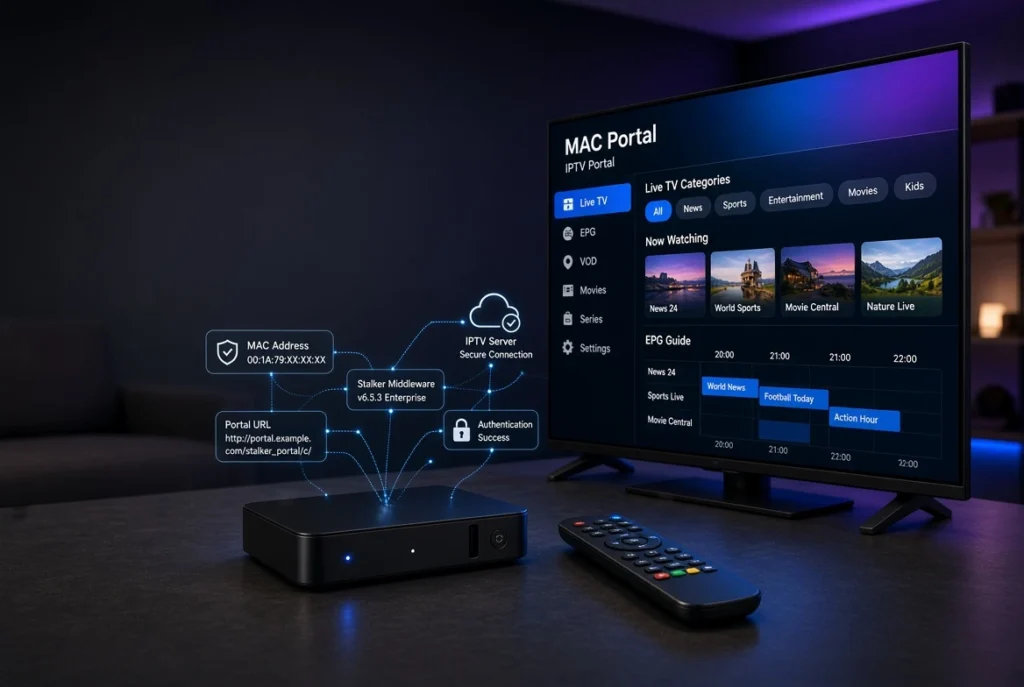
If you are exploring IPTV technology, you have probably encountered terms such as MAC Portal, IPTV MAC Portal, MAG Portal, MAC address, Stalker Middleware, M3U, and Xtream Codes. These technologies are often mentioned together, but they do not all work in the same way. Understanding the differences is important if you want to configure an IPTV device correctly and troubleshoot connection or authentication problems.
A MAC Portal is commonly associated with IPTV systems that identify a compatible device through its MAC address and connect it to a portal or middleware server. Instead of entering a traditional M3U playlist URL or Xtream Codes username and password, the device may use its MAC address as part of the authentication process.
This type of IPTV setup is particularly associated with MAG devices and Stalker Middleware, although terminology can vary between IPTV platforms and providers. The portal normally acts as the connection point between the IPTV device and the backend system that delivers the available services, electronic program guide information, VOD data, and other metadata.
In this guide, we will explain what MAC Portal means, how MAC Portal IPTV works, what an IPTV MAC address is, how Stalker Middleware fits into the system, and how MAC-based authentication differs from M3U and Xtream Codes. We will also cover common setup concepts and troubleshooting techniques for connection, authentication, and portal errors.
Important: A MAC Portal is not itself an IPTV subscription or a source of television content. It is a technical connection/authentication method. You need an authorized IPTV service or portal provided by the service operator, and you should only use content you are legally entitled to access.
What Is a MAC Portal in IPTV?
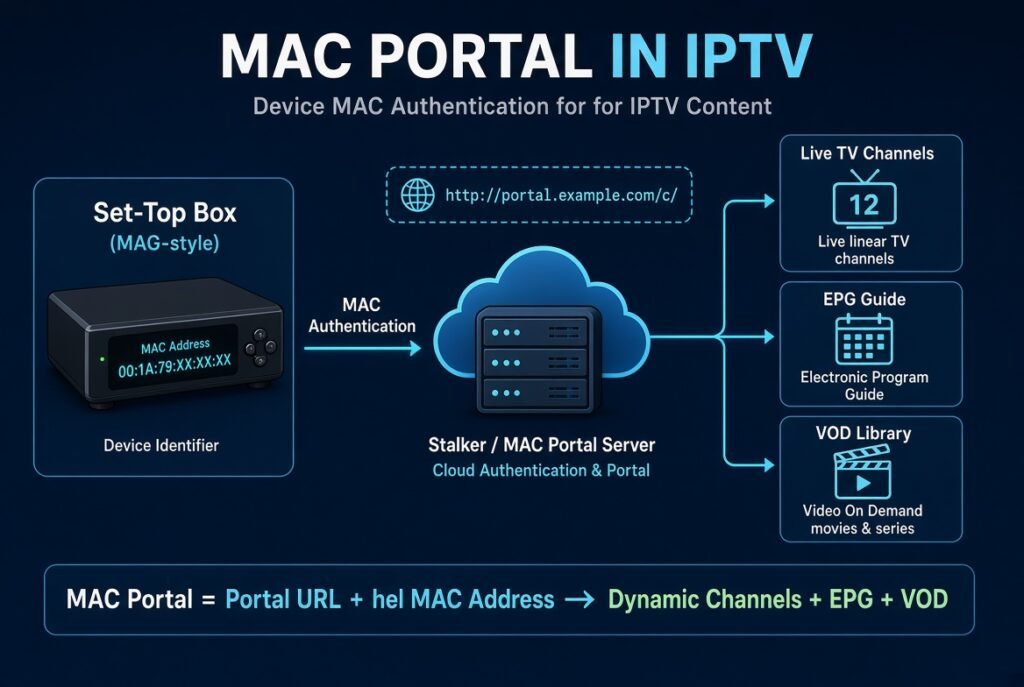
A MAC Portal is a portal-based IPTV connection method that uses a device’s MAC address to associate the device with an IPTV service.
The term “MAC” in this context refers to the Media Access Control address, a unique hardware/network identifier associated with a network interface.
In a typical MAC Portal IPTV architecture, the main components are:
- IPTV device — such as a MAG-compatible set-top box
- MAC address — identifies the device
- Portal URL — specifies the IPTV middleware/server endpoint
- Middleware — manages authentication and IPTV services
- IPTV backend — provides authorized service data
- EPG/VOD metadata — provides program and content information
The basic relationship can be represented as:
IPTV Device → MAC Address → Portal URL → Middleware → Authorized IPTV Services
The exact implementation depends on the IPTV platform and provider.
How Does MAC Portal IPTV Work?
A MAC-based IPTV system generally works through a device registration and authentication process.
1. The device connects to the internet
Your MAG-compatible device or supported IPTV application first establishes an internet connection.
2. The device identifies itself
The IPTV platform can use the device’s MAC address as an identifier.
For example, a MAC address may look like:
00:1A:79:XX:XX:XX
The actual format and address depend on the device.
3. The device contacts the portal
The configured MAC Portal URL tells the device where the IPTV middleware is located.
4. Authentication takes place
The portal checks whether the device is authorized.
5. IPTV information is delivered
After successful authentication, the middleware may provide information such as:
- Live TV categories
- Channel metadata
- EPG information
- VOD categories
- Series information
- Favorites
- Catch-up/archive information
The actual features depend on the IPTV platform.
What Is a MAC Address in IPTV?
A MAC address is a network identifier associated with a network interface.
It is important to understand that a MAC address is not the same thing as an IP address.
| MAC Address | IP Address |
|---|---|
| Hardware/network interface identifier | Network address |
| Usually represented in hexadecimal | IPv4/IPv6 format |
| Associated with a network interface | Assigned by a network |
| Can be used for device identification | Used for network communication |
| Often remains associated with the device/interface | Can change depending on the network |
In MAC Portal IPTV systems, the MAC address can be used by the IPTV platform to identify and authorize a particular device.
MAC Portal vs IPTV Portal URL
These terms are sometimes confused.
A MAC Portal describes the broader MAC-based IPTV connection/authentication method.
A Portal URL is the actual web/server address configured on the IPTV device.
For example, conceptually:
MAC address: identifies the device
Portal URL: identifies the server endpoint
Therefore, entering a portal URL does not necessarily mean you are using a particular IPTV subscription. The portal must recognize and authorize your device.
MAC Portal and Stalker Middleware
Stalker Middleware is historically associated with MAG-style IPTV systems and portal-based IPTV deployments.
It provides a middleware layer between IPTV devices and the backend service.
Depending on the implementation, middleware can manage:
- Device authentication
- Live TV categories
- VOD
- EPG
- User/device authorization
- Favorites
- Catch-up
- Content metadata
Modern IPTV platforms can use different middleware solutions, so “Stalker Portal” and “MAC Portal” should not automatically be treated as identical terms.
MAG MAC Portal: Complete Setup Guide
MAG devices are among the devices most commonly associated with MAC Portal IPTV systems.
A typical setup process looks like this:
Step 1: Connect your MAG device
Connect the device to your TV and establish an internet connection.
Step 2: Open the network settings
Verify that the device has a working internet connection.
Step 3: Find the device MAC address
Locate the MAC address displayed by the device.
Step 4: Open the portal settings
Navigate to the portal configuration area.
Step 5: Enter your authorized Portal URL
Enter the portal address supplied by your IPTV provider.
Step 6: Save the configuration
Save the settings and restart the device if required.
Step 7: Allow authentication
The portal should recognize the registered device if the provider has correctly authorized the MAC address.
Do not use random portal URLs found online. Portal addresses are normally supplied by the IPTV service operator.
How to Find Your MAG MAC Address
The exact menu names can vary between MAG models and firmware versions.
Generally, you can find the MAC address through the device’s:
Settings → Network → Information
or a similar network information section.
Some MAG devices may also display the MAC address on the device information screen.
Look for a value resembling:
00:1A:79:XX:XX:XX
Record it carefully if your authorized IPTV provider requires it for device registration.
How to Set Up IPTV Using a MAC Portal
Once you have an authorized MAC Portal service, the general configuration process is straightforward.
You normally need:
- A compatible IPTV device
- A stable internet connection
- The device’s MAC address
- An authorized IPTV account/service
- The official Portal URL supplied by the provider
The provider may first register your MAC address on its backend.
You then enter the corresponding portal URL into your device.
After restarting the device, the middleware attempts to authenticate the registered MAC address.
MAC Portal on Smart TVs and IPTV Players
MAC Portal support is not universal across IPTV applications.
Many modern IPTV players primarily support:
- M3U playlists
- Xtream Codes
- API credentials
- Portal URLs
- Other application-specific login methods
Some applications or platforms may support MAC-based authentication, while others do not.
Therefore, before trying to configure a MAC Portal, check whether your specific IPTV player supports MAC Portal/Stalker Portal authentication.
This is particularly important on:
- Samsung Smart TV
- LG Smart TV
- Android TV
- Google TV
- Fire TV
- Android TV boxes
- MAG devices
A player that supports M3U does not automatically support MAC Portal.
MAC Portal vs M3U vs Xtream Codes
These are different IPTV connection methods.
| Feature | MAC Portal | M3U | Xtream Codes |
|---|---|---|---|
| Device identification | MAC address | Usually playlist URL | Username/password |
| Portal URL | Usually required | Playlist URL | Server URL |
| Middleware | Commonly used | Not necessarily | Commonly used |
| Login credentials | Often device-based | Usually URL-based | Username + password |
| EPG | Platform dependent | Often XMLTV | Often integrated |
| MAG compatibility | Excellent | Depends on device | Depends on device |
| Player compatibility | Limited/implementation-specific | Very broad | Broad |
Which is better?
There is no universal winner.
MAC Portal can be convenient for compatible MAG-style systems.
M3U is flexible and widely supported by IPTV players.
Xtream Codes can provide a structured login experience and may organize live TV, VOD, series, and EPG information efficiently.
The best option depends on your device and the IPTV service you are using.
How MAC Portal Authentication Works
The authentication process generally involves several stages:
Device → Portal → Middleware → Authentication → Service Data
The middleware can check information associated with the device before allowing access.
For example, the backend may verify:
- MAC address
- Device registration
- Subscription status
- Portal authorization
- Expiration status
- Connection permissions
If the device is not registered or the service has expired, authentication may fail.
This is one reason why simply knowing a portal address does not guarantee access.
Common MAC Portal Problems and Solutions
MAC Portal systems can experience several common problems.
Portal does not load
Possible causes include:
- Incorrect portal URL
- Internet connection problem
- Server downtime
- DNS problems
- Incorrect device configuration
Authentication fails
Possible causes include:
- MAC address not registered
- Expired service
- Incorrect device information
- Provider-side authentication issue
Channels do not appear
Possible causes include:
- Incomplete authentication
- Server-side configuration
- Subscription limitations
- Middleware problems
EPG is missing
Possible causes include:
- Missing EPG data
- Incorrect channel mapping
- Server-side EPG issue
- Temporary metadata outage
MAC Portal Not Working: Troubleshooting Guide
If your IPTV MAC Portal is not working, follow these steps.
1. Check your internet connection
Test another application or website on the same network.
2. Verify the Portal URL
Make sure the URL supplied by your authorized provider has been entered correctly.
3. Restart the IPTV device
A simple reboot can resolve temporary network or middleware problems.
4. Check the MAC address
Confirm that the MAC address registered with the provider matches the device you’re using.
5. Check service status
Your IPTV service may have expired or the portal server may temporarily be unavailable.
6. Test the network
If possible, temporarily use another network to determine whether the issue is related to your Wi-Fi or ISP connection.
7. Contact the service operator
If authentication continues to fail, the provider may need to check your device registration or server-side configuration.
MAG Portal Connection Errors and Fixes
A MAG Portal connection failed message can have multiple causes.
Start with the simplest checks:
- Restart your router.
- Restart your MAG device.
- Verify the Ethernet/Wi-Fi connection.
- Recheck the Portal URL.
- Confirm the MAC address.
- Check whether the service is active.
- Check whether the portal server is online.
If everything appears correct but the connection still fails, the problem may be on the IPTV server or middleware side rather than your device.
How to Change or Update a MAC Portal
If your IPTV provider gives you a new portal address, you can generally update the portal configuration through your compatible device’s portal settings.
The general process is:
Portal Settings → Replace Existing URL → Enter New Authorized URL → Save → Restart
Avoid changing portal addresses randomly. A new portal URL should come from the service operator that manages your subscription.
MAC Portal Security and Privacy
Because MAC-based IPTV systems associate a service with a device identifier, you should treat your MAC address as sensitive account information.
Avoid publicly posting:
- Your MAC address
- Portal URL
- IPTV credentials
- Username
- Password
- API information
You should also avoid using unofficial IPTV portals that request unnecessary personal information or suspicious software installations.
A VPN can provide additional network privacy, but it does not make an unauthorized IPTV service legal.
Frequently Asked Questions About MAC Portal
What is MAC Portal IPTV?
MAC Portal IPTV is a portal-based IPTV connection method that can use a device’s MAC address for identification and authentication.
What is an IPTV MAC address?
It is the MAC address of the network interface/device used by an IPTV system to identify the device.
Is MAC Portal the same as M3U?
No. MAC Portal and M3U are different IPTV connection methods.
Is MAC Portal the same as Xtream Codes?
No. Xtream Codes generally uses a server URL together with a username and password, while MAC-based systems commonly identify a compatible device through its MAC address.
What is a Stalker Portal MAC?
It generally refers to a MAC address used to identify a compatible IPTV device within a Stalker/Middleware-based portal system.
Can I use MAC Portal on every Smart TV?
No. Support depends on the IPTV application and platform. Many Smart TV IPTV players support M3U or Xtream Codes instead.
Why is my MAC Portal not working?
Common reasons include an incorrect portal URL, network problems, an unregistered MAC address, an expired service, or a server-side problem.
Can I convert MAC Portal to M3U?
Not directly in the same way you would convert a file format. MAC Portal and M3U represent different methods of accessing IPTV services. Whether an IPTV provider can offer an M3U playlist depends on its platform and service configuration.
Final Thoughts
Understanding MAC Portal IPTV is essential if you are working with MAG devices, Stalker Middleware, or other IPTV systems based on device authentication. Unlike an M3U playlist, which primarily provides a structured list of media streams, or Xtream Codes, which commonly uses server information and account credentials, a MAC Portal system can associate access with a specific device through its MAC address.
The overall architecture can be summarized as:
MAC Address → Portal URL → Middleware → Authentication → IPTV Service
This approach can make device-based IPTV management straightforward when the platform is properly configured. However, compatibility is an important consideration. A MAC Portal will not automatically work with every IPTV player, Smart TV, Firestick, Android TV device, or streaming application.
For troubleshooting, always start with the basics: verify your internet connection, confirm the Portal URL, check the registered MAC address, restart the device, and determine whether the IPTV server itself is available. If authentication continues to fail, the service operator may need to investigate the account or device registration on the backend.
Finally, remember that MAC Portal is a technology for connecting and authenticating IPTV devices—it is not an IPTV subscription by itself. Always use authorized IPTV services and content you have the right to access.


