
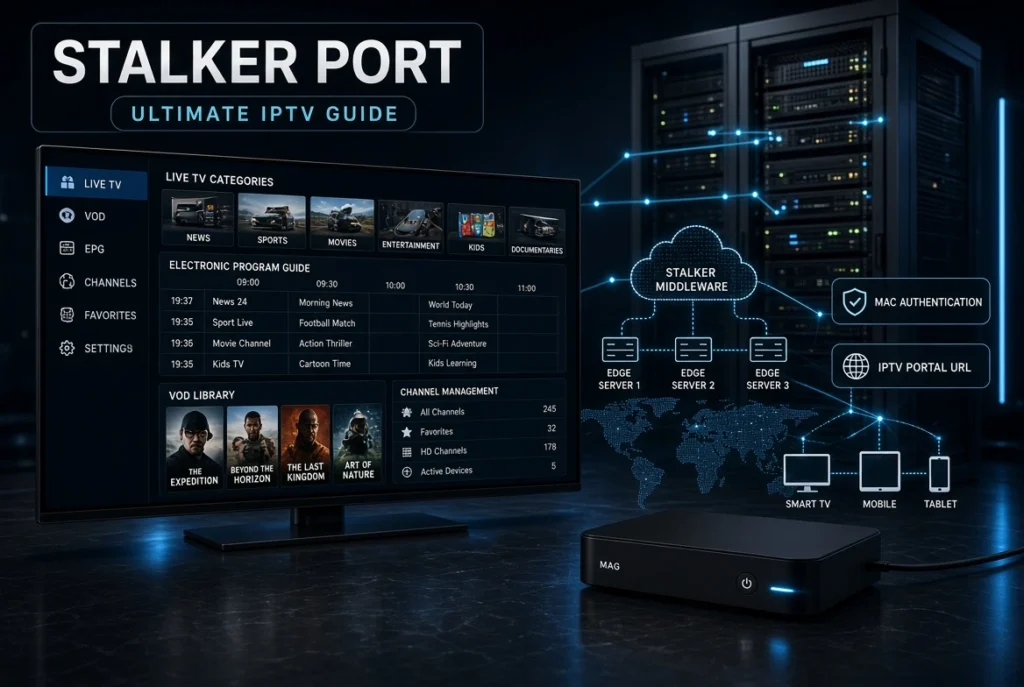
Stalker Portal is an important part of the IPTV ecosystem, particularly for MAG devices, STBEmu, and IPTV middleware platforms that use portal-based authentication. Unlike an M3U playlist or Xtream Codes login, a Stalker Portal typically connects an IPTV set-top box or emulator to a server through a portal URL and device identity, commonly involving a MAC address.
In this guide, we’ll explain what Stalker Portal is, how Stalker Middleware works, how MAC authentication works, how to configure a portal, and how Stalker Portal compares with M3U and Xtream Codes. We’ll also cover common connection, authentication, and server errors.
Important: Stalker Portal is a technology used by IPTV platforms. A portal itself does not automatically provide legal access to TV channels. You should only use portals and IPTV services that you are authorized to access.
What Is Stalker Portal?
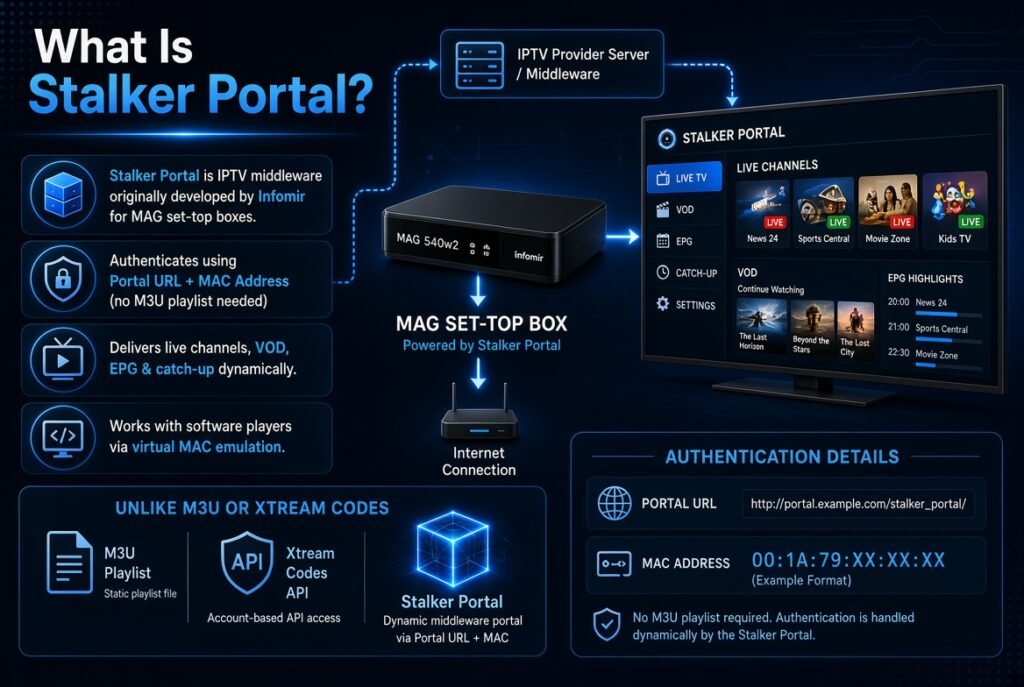
A Stalker Portal is a web-based IPTV portal used by compatible set-top boxes and IPTV applications to communicate with an IPTV middleware server.
The portal acts as a connection point between the IPTV device and the backend system. Instead of manually entering an M3U playlist, a compatible device can connect to a portal URL and authenticate using its configured device information.
The technology is commonly associated with Stalker Middleware, originally developed for IPTV set-top box environments.
A typical setup can involve:
- IPTV set-top box
- MAC address
- Stalker Portal URL
- IPTV middleware server
- User account or device authorization
- EPG data
- Live TV
- VOD
- Catch-up or archive features, depending on the platform
Simple Stalker Portal Structure
IPTV Device → MAC Authentication → Stalker Portal → Middleware → IPTV Content
This architecture is different from a simple M3U-based IPTV player.
How Does Stalker Portal Work?
The basic idea behind a Stalker Portal is relatively simple.
When a compatible IPTV device starts, it communicates with the configured portal. The middleware identifies the device and determines whether it is authorized.
The process can look like this:
- The user opens the IPTV application or set-top box.
- The device sends a request to the configured portal.
- The middleware identifies the device.
- The server checks the device’s authorization.
- The server returns the appropriate account configuration.
- The device receives available IPTV services.
- EPG, VOD, categories, and other metadata can be loaded.
- The user can access the services permitted by the IPTV platform.
This is why Stalker Portal authentication is different from entering a simple username and password.
What Is Stalker Middleware?
Stalker Middleware is the backend software layer responsible for managing IPTV services and compatible subscriber devices.
It can provide functionality such as:
- Device authentication
- Subscriber management
- IPTV service management
- Channel organization
- EPG management
- VOD management
- User/device activation
- Portal communication
- Content metadata
- Account restrictions
In other words, the portal is the connection interface, while the middleware provides much of the backend functionality.
Stalker Portal IPTV Architecture
A typical Stalker IPTV architecture contains several components.
1. IPTV Client
The client can be a compatible set-top box or application such as an STB emulator.
2. Portal
The portal URL provides the endpoint through which the client communicates with the IPTV platform.
3. Middleware
The middleware handles authentication, users, devices, services, and metadata.
4. Streaming Infrastructure
The actual media may be delivered through separate streaming servers or content delivery infrastructure.
5. EPG System
Electronic Program Guide information can be provided through the IPTV platform and associated metadata systems.
This separation is important because Stalker Portal is not itself the video stream. It is part of the IPTV management and delivery architecture.
Stalker Portal URL
A Stalker Portal URL is the server address configured inside a compatible IPTV device or application.
The exact URL is determined by the IPTV platform administrator or authorized service provider.
A portal address should not be confused with:
- M3U playlist URL
- M3U8 stream URL
- Xtream Codes server URL
- XMLTV EPG URL
Each represents a different type of IPTV resource.
Portal URL vs M3U URL
| Feature | Stalker Portal | M3U |
|---|---|---|
| Authentication | Device/portal based | Usually playlist based |
| Typical credential | MAC/device identity | Playlist URL or credentials |
| Middleware | Usually involved | Not required |
| EPG | Platform-dependent | Often metadata/XMLTV |
| VOD | Platform-dependent | Playlist dependent |
| Typical environment | STB/middleware | IPTV players |
Stalker Portal MAC Authentication
One of the most recognizable characteristics of Stalker IPTV systems is MAC-based authentication.
A MAC address is a hardware/network identifier associated with a network interface. In IPTV environments, a compatible platform may use the device MAC address as part of its subscriber authorization process.
The process can conceptually look like:
MAC Address → Portal Request → Authentication → Authorized Profile → IPTV Services
However, implementation varies between platforms, and a MAC address alone does not guarantee access.
Stalker Portal MAC Address
A Stalker Portal MAC address generally refers to the MAC address configured or recognized by the IPTV middleware.
For legitimate setups, you normally obtain the required portal information and device authorization from the IPTV platform administrator or service provider.
Avoid using another person’s MAC address or attempting to bypass device authentication.
How to Use Stalker Portal
The exact procedure depends on the device or application.
Generally, the process involves:
- Install a compatible IPTV client.
- Open the portal configuration.
- Enter the authorized Stalker Portal URL.
- Configure the appropriate device identity if required.
- Save the configuration.
- Restart or reconnect the application.
- Allow the portal to authenticate the device.
- Wait for the IPTV interface and available services to load.
The portal URL and authorization details should come from your legitimate IPTV platform.
Stalker Portal Setup on MAG Devices
MAG devices are strongly associated with portal-based IPTV environments.
A typical MAG setup involves:
- Connect the MAG device to the internet.
- Open the network settings and verify connectivity.
- Open the portal configuration section.
- Enter the authorized portal address.
- Save the configuration.
- Restart the device.
- Allow the middleware to authenticate the device.
The exact menu names can vary depending on the MAG firmware and model.
MAG Stalker Portal
The relationship can be summarized as:
MAG Device → Stalker Portal → Middleware → Authorized IPTV Services
This differs from installing a generic IPTV player and importing an M3U playlist.
STBEmu Stalker Portal
STBEmu is an Android application designed to emulate certain IPTV set-top-box environments.
Because of this, it can be used with compatible portal-based IPTV platforms.
A typical STBEmu configuration involves:
- Opening the application
- Creating or selecting a profile
- Configuring the portal
- Entering the authorized portal URL
- Configuring the appropriate device information
- Restarting or reconnecting the profile
The exact options available can vary by STBEmu version and configuration.
Stalker Portal Activation
Stalker Portal activation usually means that the IPTV middleware has authorized a particular device or subscriber profile.
Activation may depend on:
- MAC address
- Device identifier
- Subscription status
- Account status
- Portal configuration
- Server authorization
If the device has not been authorized by the IPTV platform, simply entering a portal URL may not be enough.
Stalker Portal EPG
EPG stands for Electronic Program Guide.
A Stalker-based IPTV platform can provide program information through its middleware system, allowing compatible clients to display:
- Program titles
- Start times
- End times
- Channel information
- Program descriptions
- Current/next program information
The availability and quality of EPG data depend on the IPTV platform.
Stalker Portal XMLTV
Some IPTV systems may use XMLTV-based data as part of their EPG infrastructure, while others manage EPG information directly through the middleware.
Therefore, Stalker Portal EPG and XMLTV EPG are related concepts but are not necessarily the same thing.
Stalker Portal VOD
VOD means Video on Demand.
If supported by the IPTV platform, Stalker Middleware can organize VOD content into categories and provide metadata such as:
- Movie title
- Description
- Genre
- Poster artwork
- Release information
- Playback options
VOD availability depends entirely on the backend platform and the user’s authorized service.
Stalker Portal vs M3U
Stalker Portal and M3U represent two different approaches to IPTV delivery.
M3U
M3U is primarily a playlist format containing media entries and associated metadata.
Stalker Portal
Stalker Portal is part of a middleware-based IPTV architecture involving a portal, device authentication, and backend management.
M3U is generally simpler, while Stalker-based systems can provide a more integrated set-top-box experience.
Stalker Portal vs Xtream Codes
Xtream Codes-style systems generally use credentials such as:
- Username
- Password
- Server URL
A Stalker Portal environment can instead rely heavily on:
- Portal URL
- Device identity
- MAC-based authentication
- Middleware
Quick Comparison
| Feature | Stalker Portal | Xtream Codes |
|---|---|---|
| Portal URL | Yes | Server URL |
| MAC authentication | Common | Not the primary method |
| Username/password | Platform dependent | Common |
| Middleware | Central component | Backend/API architecture |
| M3U | Different system | Can often generate playlist access |
| Set-top-box focus | Strong | Player-focused |
Neither method is universally “better.” The appropriate option depends on the IPTV platform and compatible client.
Stalker Middleware vs Ministra
Stalker Middleware is the older name associated with the middleware ecosystem, while Ministra TV Platform is a later commercial platform associated with the same broader middleware lineage.
Both are designed around IPTV service management and subscriber/device administration.
The exact features depend on the platform version and deployment.
Stalker Portal Not Working: Common Causes
If your Stalker Portal is not working, several issues may be responsible.
1. Incorrect Portal URL
A single character error can prevent the client from reaching the server.
2. Device Not Authorized
The MAC address or device identity may not be registered.
3. Server Downtime
The IPTV middleware server may temporarily be unavailable.
4. Internet Connection
Poor connectivity can prevent the portal from loading correctly.
5. DNS Problems
DNS resolution issues can prevent the device from reaching the portal.
6. Outdated Client
An outdated application or firmware can cause compatibility issues.
7. Expired Authorization
Your authorized account or device access may have expired.
Stalker Portal Connection Failed
A Stalker Portal connection failed message usually indicates that the client cannot establish a successful connection with the portal.
Try these basic troubleshooting steps:
- Check your internet connection.
- Verify the portal URL.
- Restart the IPTV device.
- Restart your router.
- Check whether other websites work.
- Confirm that your device is authorized.
- Check the IPTV platform’s server status.
- Update the IPTV application or device firmware.
If everything is correct but the portal still fails, contact the administrator of the IPTV service.
Stalker Portal Authentication Failed
Authentication errors are different from simple connection problems.
If you see Stalker Portal authentication failed, possible causes include:
- Incorrect device identity
- Unauthorized MAC address
- Expired subscription
- Server-side account restriction
- Incorrect portal configuration
- Middleware authentication failure
In this situation, repeatedly changing settings may not solve the problem because the authorization must be corrected on the server side.
MAG Portal Not Working
For MAG devices, check the following:
- Internet connection
- Portal URL
- Device MAC address
- Portal activation
- Device reboot
- Firmware compatibility
- Server availability
If the portal was recently changed, the new portal information may need to be provided by the authorized service administrator.
Stalker Portal Security and Privacy
Because portal-based IPTV systems can involve device identifiers and account information, security is important.
Protect Your Information
Do not publicly share:
- MAC address
- Portal URL associated with your account
- Account credentials
- Device identifiers
- Private IPTV configuration information
Also avoid suspicious IPTV portals that request unnecessary personal information or payment details.
A VPN can improve network privacy in some situations, but it cannot fix an incorrectly configured portal or server-side authentication problem.
Stalker Portal Codes: What Are They?
Searches such as “Stalker Portal codes” or “Stalker Portal code” can refer to different things depending on the IPTV platform.
There is no universal Stalker Portal code that provides access to every IPTV service.
Access normally depends on the specific platform’s:
- Portal URL
- Device authorization
- MAC/device identity
- Subscription
- Middleware configuration
Be cautious of websites claiming to provide universal Stalker codes or unauthorized access credentials.
Stalker Portal vs M3U vs Xtream Codes
The three technologies can be summarized like this:
M3U:
A playlist format used to describe media streams.
Xtream Codes:
An IPTV authentication/API-oriented method commonly used by IPTV players to access categorized live TV, VOD, and related services.
Stalker Portal:
A middleware-based IPTV architecture commonly associated with set-top boxes, portal URLs, and device authentication.
Understanding this distinction is essential when configuring IPTV applications.
Frequently Asked Questions About Stalker Portal
What is Stalker Portal?
Stalker Portal is an IPTV portal technology that allows compatible clients and set-top boxes to communicate with IPTV middleware and access authorized services.
What is Stalker Middleware?
Stalker Middleware is the backend software layer used to manage IPTV users, devices, services, EPG, VOD, and authentication.
What is a Stalker Portal URL?
It is the server address used by a compatible IPTV client to connect to the Stalker-based IPTV platform.
Does Stalker Portal use a MAC address?
Many Stalker-based systems use MAC/device-based authentication, particularly in MAG and set-top-box environments.
What is STBEmu?
STBEmu is an Android application designed to emulate certain IPTV set-top-box environments and can work with compatible portal-based systems.
Is Stalker Portal the same as M3U?
No. M3U is a playlist format, while Stalker Portal is part of a middleware-based IPTV architecture.
Is Stalker Portal the same as Xtream Codes?
No. They use different approaches to IPTV authentication and service delivery.
Why is my Stalker Portal not working?
Common causes include an incorrect portal URL, unauthorized device, server downtime, network problems, DNS issues, or expired access.
Can I use Stalker Portal on any IPTV player?
No. The application must support the relevant Stalker/Middleware environment. Compatibility varies between IPTV players and devices.
Final Thoughts
Stalker Portal is an important IPTV technology that sits between the client device and the IPTV middleware infrastructure. Instead of simply loading a playlist, a portal-based system can provide a more integrated environment for device authentication, user management, live TV, EPG, VOD, and other IPTV services.
Understanding the difference between Stalker Portal, Stalker Middleware, MAC authentication, M3U, Xtream Codes, XMLTV, and IPTV Portal URLs makes IPTV configuration much easier. Each technology serves a different role within the overall streaming architecture.
For users, the most important point is that a Stalker Portal is not a universal IPTV subscription or a magic access code. The portal must belong to an authorized IPTV platform, and the device generally needs to be properly registered or authenticated.
Whether you are using a MAG device, STBEmu, or another compatible IPTV client, troubleshooting should begin with the basics: verify the portal URL, check your internet connection, confirm device authorization, and make sure the IPTV server is available. Once these components are correctly configured, the middleware can handle the communication between the client and the services provided by the IPTV platform.


