
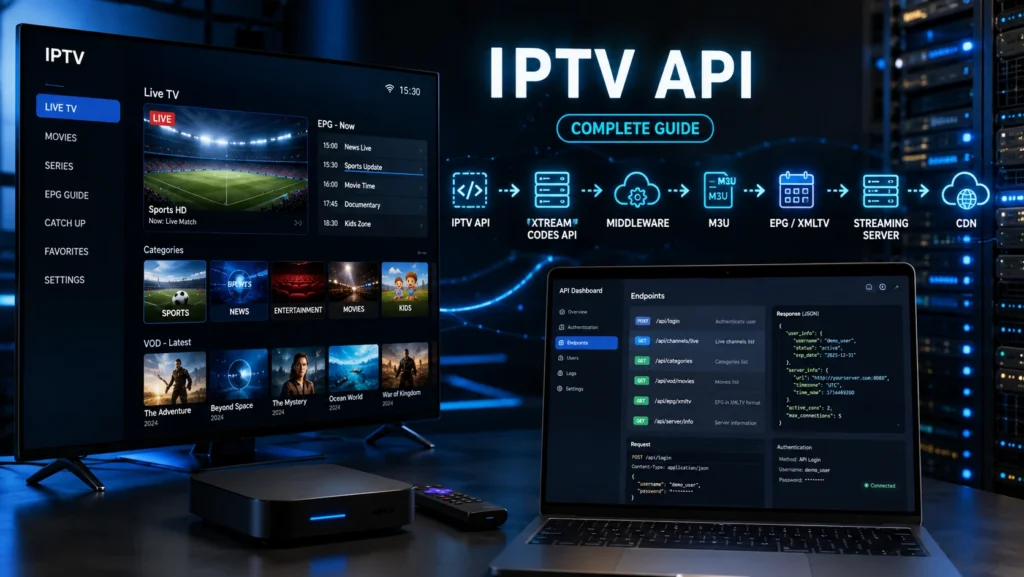
If you are researching IPTV API technology, you will quickly encounter terms such as Xtream Codes API, IPTV Middleware API, Stalker Portal API, Ministra API, M3U API, EPG API, XMLTV API, IPTV Player API, and IPTV Streaming API. Although these technologies are related, they do not all serve the same purpose.
An IPTV API is essentially a software interface that allows an application, IPTV platform, player, or backend system to communicate with IPTV services and retrieve information such as channels, categories, VOD content, EPG data, user information, and streaming URLs.
In this guide, we will explain what an IPTV API is, how IPTV APIs work, the main types of IPTV APIs, authentication, API endpoints, JSON responses, M3U integration, EPG APIs, Xtream Codes API, middleware APIs, and common IPTV API errors.
Important: An IPTV API does not automatically provide legal access to television content. Always use APIs and IPTV services for content you are authorized to access.
What Is IPTV API?
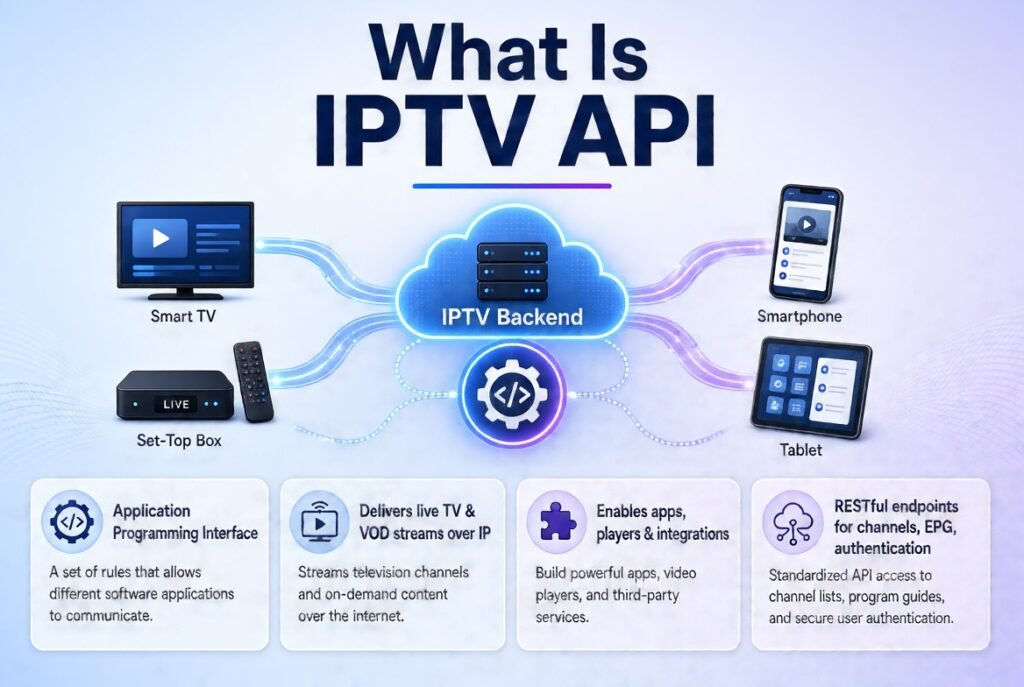
An IPTV API is an application programming interface designed to allow software applications to communicate with an IPTV backend or streaming platform.
Instead of manually managing every piece of information, an application can send an API request and receive structured information from the server.
For example, an IPTV application might request:
- Live TV categories
- Channel lists
- VOD categories
- Movies
- Series
- EPG information
- Account status
- Server information
- Stream URLs
- User/device information
The API can then return the requested information in a structured format, commonly JSON.
Simple IPTV API Architecture
IPTV Player / Application ↓ API Request ↓ IPTV API Server ↓ Authentication ↓ IPTV Middleware ↓Channels / VOD / EPG / Metadata ↓ API Response
This makes APIs an important component of modern IPTV software architecture.
How Does IPTV API Work?
The basic operation of an IPTV API follows the same general concept as other web APIs.
Step 1: The Application Connects
An IPTV player or application connects to the IPTV API server.
Step 2: Authentication
The API may require credentials such as:
- Username
- Password
- API key
- Token
- Device identifier
Step 3: API Request
The application sends a request to a specific API endpoint.
Step 4: Server Processing
The IPTV backend processes the request and checks permissions.
Step 5: API Response
The server returns information, often in JSON format.
Step 6: Application Displays the Data
The IPTV player processes the response and displays channels, VOD, EPG, categories, or other information.
IPTV API Architecture
There are several layers that can exist in an IPTV API architecture.
IPTV API
The main communication layer between applications and the IPTV backend.
Xtream Codes API
An IPTV-oriented API architecture widely encountered in compatible IPTV players.
IPTV Middleware API
Provides communication with an IPTV middleware platform.
Stalker Portal API
Used within Stalker/Middleware environments and compatible client systems.
Ministra API
Associated with the Ministra TV Platform ecosystem.
IPTV M3U API
Can generate or manage playlist information that applications consume as M3U data.
IPTV EPG API / XMLTV API
Provides electronic program guide information.
IPTV Player API
Allows an IPTV application to communicate with a backend service.
IPTV Streaming API
Handles or exposes information related to media streams and playback.
IPTV REST API
Uses conventional HTTP-based API architecture and commonly returns JSON data.
Xtream Codes API
One of the most commonly searched IPTV API technologies is the Xtream Codes API.
Many IPTV players support a login method based on:
- Server URL
- Username
- Password
The player communicates with the IPTV backend and can retrieve information such as:
- Live categories
- Live channels
- VOD categories
- Movies
- Series
- EPG
- Account information
The exact API implementation and available endpoints depend on the server software.
Xtream Codes API Login
A typical player interface may request:
Server URL:
Your authorized IPTV server address
Username:
Your account username
Password:
Your account password
The application then uses these credentials to communicate with the backend.
Never publish your real IPTV username, password, API token, or private server URL publicly.
IPTV API URL
An IPTV API URL is the address used by an application to communicate with the API server.
It can contain a base server address followed by an API endpoint and parameters.
Conceptually:
https://example.com/api/endpoint
A production API may use authentication parameters, headers, tokens, or other security mechanisms.
The exact URL structure depends entirely on the API implementation.
IPTV API Endpoint
An API endpoint is a specific location on the server responsible for a particular operation.
For example, an API could conceptually have endpoints for:
/api/login/api/channels/api/categories/api/epg/api/vod/api/user
These are examples of API architecture rather than universal IPTV endpoints.
Different IPTV platforms can use completely different endpoint structures.
IPTV API JSON
JSON is one of the most common data formats used by modern APIs.
A simplified IPTV API response might look like:
{ "status": "active", "username": "example", "channels": 1200}
A channel response could contain information such as:
{ "id": 123, "name": "Example Channel", "category": "News", "stream_url": "https://example.com/stream"}
Real-world API responses vary significantly between platforms.
IPTV API Authentication
Authentication is one of the most important parts of an IPTV API.
An API needs to determine whether the requesting application is authorized.
Common authentication methods include:
Username and Password
Frequently used in IPTV applications.
API Key
A unique key identifies an application or account.
Access Token
A temporary or persistent token can be used to authenticate API requests.
Device Authentication
Some IPTV platforms associate access with a particular device.
MAC-Based Authentication
Middleware-based systems may associate an IPTV device with a MAC address.
Authentication protects API resources from unauthorized access.
IPTV API vs M3U
Although M3U and IPTV APIs are related to IPTV, they are fundamentally different.
| Feature | IPTV API | M3U |
|---|---|---|
| Type | Software interface | Playlist format |
| Data | Dynamic/API responses | Playlist entries |
| Authentication | Common | Depends on service |
| EPG | Can be integrated | Often separate |
| VOD | Can provide structured data | Can contain VOD entries |
| Categories | API-managed | Playlist metadata |
| Applications | Players/backend systems | Players |
| Flexibility | High | Simpler |
In simple terms:
M3U = playlist
API = communication interface
An API can actually generate or manage playlist-related information, but the concepts should not be confused.
IPTV API vs Xtream Codes API
Xtream Codes API can be considered a specific IPTV-oriented API approach, while IPTV API is a much broader term.
Think of it like this:
IPTV API
↳ Xtream-style API
↳ Middleware API
↳ Stalker-related API
↳ EPG API
↳ Player API
↳ Streaming API
↳ REST API
Therefore, Xtream Codes API is not synonymous with every IPTV API.
IPTV Middleware API
An IPTV Middleware API connects applications to an IPTV middleware platform.
Middleware sits between the user-facing application and backend services.
It can manage:
- Subscribers
- Devices
- Packages
- Channels
- VOD
- EPG
- Authentication
- Permissions
- User profiles
This makes middleware APIs particularly important for IPTV platforms with large numbers of users and devices.
Stalker Portal API
Stalker Portal environments use middleware-based architecture to manage compatible IPTV devices.
A Stalker-based system may involve:
Device → Portal → Middleware → Authentication → Services
The API or backend layer can manage information associated with:
- Devices
- Subscribers
- Services
- EPG
- VOD
- Authentication
Stalker-based IPTV should not be confused with M3U playlist-based systems.
Ministra API
The Ministra TV Platform ecosystem provides middleware functionality for IPTV operators and service platforms.
A Ministra-style environment can include:
- Subscriber management
- Device management
- Live TV
- VOD
- EPG
- Authentication
- Service packages
APIs can allow external applications or systems to interact with backend functionality where supported by the platform.
IPTV M3U API
An IPTV M3U API can be used to dynamically generate or retrieve playlist information.
Instead of manually maintaining a static playlist, an application can request updated playlist information from a server.
This can be useful when:
- Channels change
- Categories change
- Stream URLs change
- Accounts expire
- New content is added
The API can generate a playlist based on the user’s permissions.
IPTV EPG API and XMLTV API
An IPTV platform also needs program information.
This is where EPG APIs and XMLTV become important.
An EPG system can provide:
- Program titles
- Start times
- End times
- Channel identifiers
- Program descriptions
- Categories
XMLTV is a popular XML-based format for storing TV program information.
IPTV API + EPG
A modern IPTV application can obtain:
Channel Data → API
Program Data → EPG/XMLTV
Video → Streaming Server/CDN
These systems can work together while serving completely different purposes.
IPTV Player API
An IPTV Player API allows an IPTV application to communicate with an IPTV backend.
A player may use an API to obtain:
- Channel lists
- Categories
- VOD
- EPG
- User status
- Stream information
- Metadata
This can provide a richer experience than simply loading a static playlist.
IPTV Streaming API
An IPTV Streaming API focuses on information related to media delivery.
Depending on the architecture, it can interact with:
- Live streams
- VOD
- HLS
- MPEG-DASH
- Stream metadata
- Playback URLs
- Authentication tokens
The actual video delivery is usually handled by streaming infrastructure rather than the API itself.
For example:
API → Provides stream information
CDN/Streaming Server → Delivers video
IPTV API on Android and Smart TVs
IPTV APIs can be integrated into applications running on many platforms.
Android
Android IPTV applications can communicate with APIs to retrieve channels, VOD, EPG, and account information.
Android TV
Android TV applications can use API-based authentication and content retrieval.
Firestick / Fire TV
Compatible IPTV applications can communicate with IPTV APIs through their network connection.
Smart TVs
Depending on the operating system, applications can consume APIs to retrieve IPTV data.
The important distinction is that API compatibility depends on the IPTV application, not simply the television brand.
IPTV API and M3U Playlist
Some IPTV platforms use APIs to create playlist URLs.
The relationship can be:
User Account ↓IPTV API ↓Playlist Generator ↓M3U Playlist ↓IPTV Player
This is why you may see terms such as:
- IPTV playlist
- M3U IPTV
- IPTV M3U
- IPTV channel list
- M3U playlist URL
- Xtream Codes API
They can be connected within the same IPTV infrastructure while remaining technically different.
IPTV API Authentication Errors
Authentication problems are among the most common IPTV API issues.
Possible causes include:
- Incorrect username
- Incorrect password
- Invalid API key
- Expired token
- Incorrect server URL
- Account expiration
- Device restrictions
- Server-side authentication problems
Basic Troubleshooting
Check:
- Username
- Password
- Server URL
- Internet connection
- Account status
- Application compatibility
- Server availability
Avoid repeatedly attempting credentials if the server has temporarily blocked requests.
IPTV API Connection Failed
If an IPTV application displays IPTV API connection failed, possible causes include:
- Server offline
- DNS problems
- Network interruption
- Incorrect URL
- Firewall restrictions
- SSL/TLS problems
- API endpoint unavailable
- Expired authorization
Testing the internet connection first can help determine whether the problem is local or server-side.
IPTV API Error
An API error can occur at different levels.
HTTP Errors
Examples include:
- 400 — Bad Request
- 401 — Unauthorized
- 403 — Forbidden
- 404 — Not Found
- 429 — Too Many Requests
- 500 — Server Error
- 502 — Bad Gateway
- 503 — Service Unavailable
These codes can provide useful clues when troubleshooting an IPTV application or backend.
IPTV API Troubleshooting
When an IPTV API isn’t working, use a structured troubleshooting process.
Check the URL
Make sure the server address is correct.
Check Authentication
Verify that the account or API key is valid.
Check Server Availability
The backend may be temporarily unavailable.
Check Network Connectivity
Test whether the device can access other internet services.
Check API Response
Developers can inspect HTTP status codes and response bodies.
Check Application Compatibility
The application may expect a different API format.
Check Rate Limits
Some APIs limit the number of requests an application can make.
IPTV API Security
API security is extremely important.
An insecure IPTV API can expose:
- User accounts
- Credentials
- Device information
- Channel metadata
- Stream URLs
- Subscription information
Recommended Security Practices
Use:
- HTTPS
- Secure authentication
- Token expiration
- Access controls
- Rate limiting
- Input validation
- Server-side authorization
- Secure password storage
- API logging and monitoring
Never expose private API credentials inside public websites or source code.
IPTV API vs IPTV Server
These terms are often confused.
IPTV Server
The server infrastructure provides or manages IPTV services.
IPTV API
The API provides a communication interface that applications can use to interact with that infrastructure.
Think of it as:
Server = infrastructure
API = communication interface
IPTV API vs IPTV Middleware
Middleware is usually a larger software layer responsible for managing users, devices, content, and services.
The API is an interface through which applications can communicate with that middleware.
Therefore:
Middleware → manages IPTV system
API → allows applications to communicate with it
IPTV API and CDN
The API and CDN also have different roles.
A typical architecture can look like:
IPTV Application ↓ IPTV API ↓ Middleware / Backend ↓ Streaming Infrastructure ↓ CDN ↓ User
The API manages communication and metadata, while the CDN distributes media efficiently to users.
This distinction is important when learning IPTV technology.
IPTV API for Developers
For developers, an IPTV API can simplify the creation of IPTV applications.
A developer can build features such as:
- Login
- Channel browsing
- Categories
- Search
- EPG
- VOD
- Favorites
- User profiles
- Playback
- Device management
The application communicates with the backend through defined API endpoints.
A well-designed API should provide clear:
- Documentation
- Authentication rules
- Endpoint definitions
- Request formats
- Response formats
- Error codes
- Rate limits
IPTV API Documentation
Good IPTV API documentation should explain exactly how developers interact with the service.
Important documentation sections include:
Authentication
How applications authenticate.
Endpoints
Available API URLs.
Parameters
Required and optional parameters.
Response Format
JSON, XML, or another format.
Error Handling
HTTP and application-specific errors.
Rate Limits
How frequently clients can send requests.
Examples
Sample requests and responses.
Without proper documentation, integrating an IPTV API becomes significantly more difficult.
Frequently Asked Questions About IPTV API
What is IPTV API?
IPTV API is a software interface that allows IPTV applications and systems to communicate with an IPTV backend.
What is Xtream Codes API?
Xtream Codes API is an IPTV-oriented API architecture commonly used by compatible IPTV applications for retrieving account, channel, VOD, and EPG information.
Is IPTV API the same as M3U?
No. M3U is a playlist format, while an API is a software communication interface.
What is an IPTV API URL?
It is the server address used by an application to communicate with an IPTV API endpoint.
What is an IPTV API key?
An API key is a credential used by some API systems to identify and authorize an application or client.
Does IPTV API provide channels?
An API can provide channel metadata or stream information, but it does not inherently provide legal content. The available content depends on the authorized IPTV backend.
What is IPTV EPG API?
An EPG API provides electronic program guide information such as program names, schedules, and channel metadata.
What is IPTV Middleware API?
It is an API that allows applications or services to communicate with an IPTV middleware platform.
Why is my IPTV API not working?
Common causes include an incorrect URL, invalid credentials, server downtime, network problems, expired authorization, or API compatibility issues.
Conclusion
IPTV API technology is one of the fundamental building blocks of modern IPTV applications and platforms. It provides a structured way for applications to communicate with IPTV backends and retrieve information such as channels, VOD, EPG, categories, user accounts, device information, and streaming metadata.
However, IPTV API should not be confused with individual technologies such as M3U, M3U8, Xtream Codes, Stalker Portal, XMLTV, HLS, MPEG-DASH, or CDN. Each has a specific role in the larger IPTV ecosystem.
For example, M3U is primarily a playlist format, Xtream Codes represents an IPTV-oriented API/authentication approach, Stalker Portal belongs to a middleware-based architecture, XMLTV provides EPG data, while HLS and MPEG-DASH handle media streaming. A CDN, meanwhile, helps distribute video content efficiently to viewers.
Understanding how these components interact gives you a much clearer picture of IPTV technology:
IPTV Application → API → Middleware/Backend → Authentication → Metadata/Streams → CDN → Viewer
This architecture is what allows modern IPTV applications to provide organized channel lists, electronic program guides, VOD libraries, search, favorites, account management, and smooth media playback across supported devices.
For developers, understanding API endpoints, authentication, JSON, REST APIs, middleware, EPG integration, playlist generation, streaming APIs, and CDN architecture is particularly valuable because these technologies work together rather than operating independently. Once you understand the role of each component, IPTV becomes much easier to analyze, configure, troubleshoot, and develop for.


