
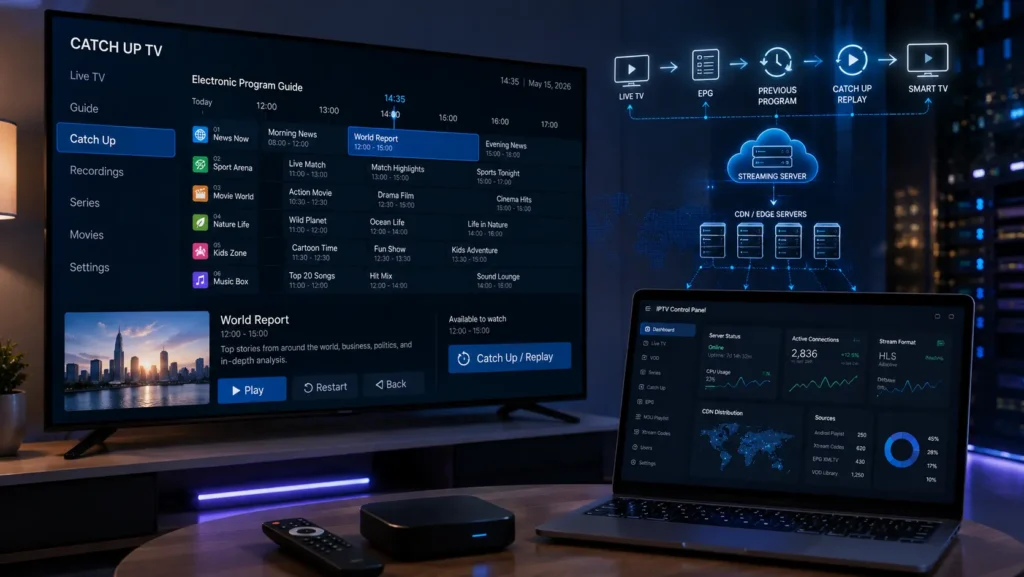
Catch Up TV is one of the most useful features available with modern IPTV services and streaming platforms. It allows viewers to watch programs they missed without waiting for a traditional replay or recording them in advance.
With Catch Up IPTV, users can often go back through the TV schedule and watch previously available programs directly from their IPTV player. Depending on the service and player, Catch Up may work with an EPG, M3U playlist, Xtream Codes, or another IPTV system.
In this guide, we explain what Catch Up TV is, how it works, how to use it with IPTV, supported devices, common problems, and the difference between Catch Up TV, Live TV, VOD, DVR, and Time Shifting.
What Is Catch-Up TV?
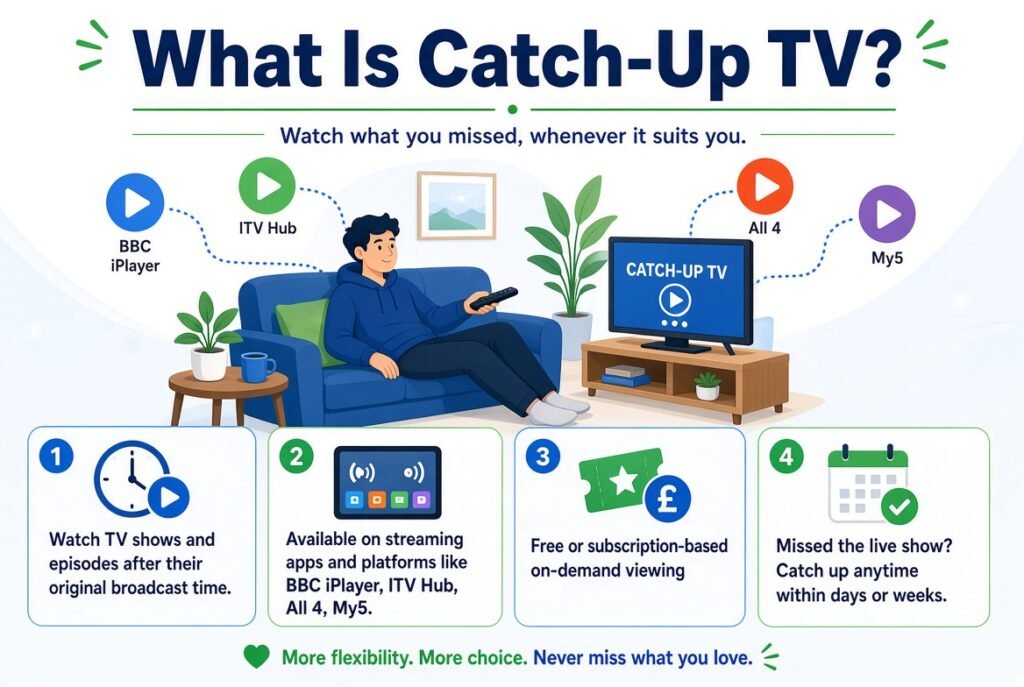
Catch-up TV is a feature that lets you watch television programs after they have already aired.
Instead of watching a program at its scheduled time, you can open the TV guide, select an earlier program, and start playback.
For example, if a program was broadcast at 8:00 PM and you were unavailable, a Catch Up feature may allow you to watch it later.
Catch-Up TV Meaning
The simple catch-up TV meaning is:
Catch Up TV allows viewers to watch previously broadcast television programs at a later time.
This makes it different from traditional Live TV, where you watch content while it is being broadcast.
What Is Catch Up IPTV?
Catch Up IPTV combines the Catch Up feature with IPTV streaming technology.
An IPTV provider may make previously broadcast programs available through its IPTV infrastructure. The IPTV player can then display those programs through the EPG or another interface.
The exact availability depends on the IPTV provider, IPTV service, player, server configuration, and content rights.
Not every IPTV service supports Catch Up TV.
How Does Catch Up TV Work?
Catch Up TV generally works through several components:
- Content source – the original video stream.
- Streaming server – processes and stores the available content.
- Catch Up system – makes previous programs available for replay.
- EPG – displays the program schedule.
- IPTV player – provides the interface used to select and watch programs.
- Internet connection – delivers the video to your device.
- CDN – may distribute video content efficiently to viewers in different locations.
When Catch Up is supported, the user can open the IPTV EPG, select a previous program, and start playback.
Catch Up TV vs Live TV
The main difference is timing.
| Feature | Live TV | Catch Up TV |
|---|---|---|
| Viewing time | During broadcast | After broadcast |
| EPG | Usually available | Often used |
| Replay | Limited | Main feature |
| Requires recording | No | Usually handled by the service |
| Best for | Watching now | Watching missed programs |
Live TV is ideal when you want to watch something as it happens. Catch Up TV is better when you missed a program and want to watch it later.
Catch Up IPTV vs VOD
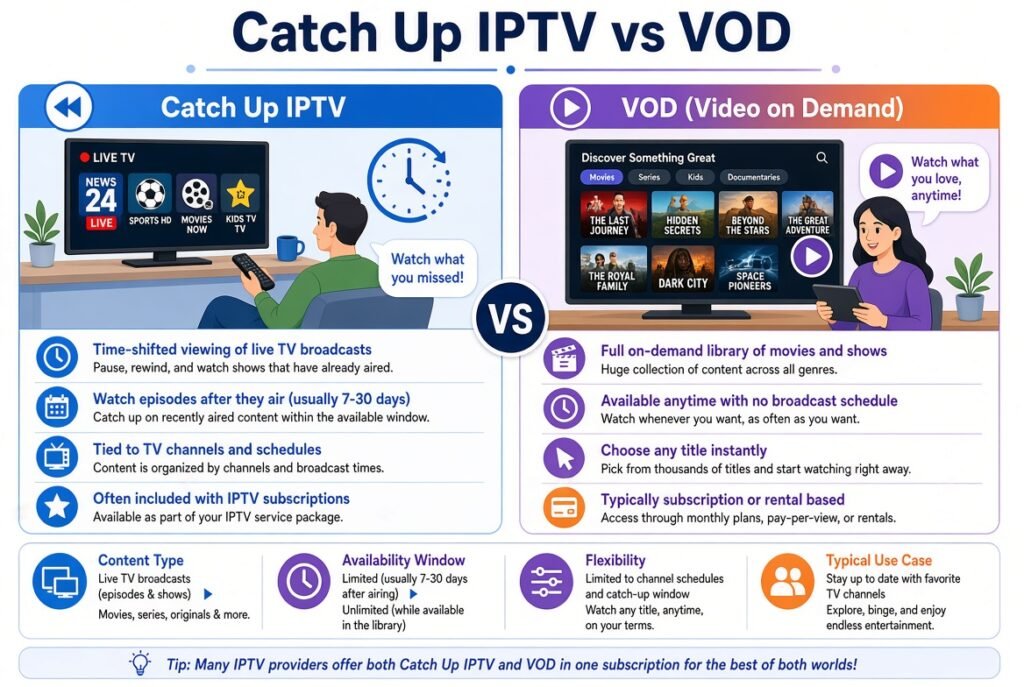
Catch Up TV and VOD (Video on Demand) may look similar, but they are technically different.
VOD provides a library of content specifically prepared for on-demand viewing.
Catch Up IPTV normally provides access to programs that were previously broadcast.
For example:
- Live TV → watch the current broadcast.
- Catch Up TV → watch a previous broadcast.
- VOD → select content from an on-demand library.
Therefore, Catch Up is closely connected to TV schedules and EPG data, while VOD is generally organized as a separate content library.
IPTV Time Shift and Catch Up TV
IPTV Time Shifting allows viewers to move backward or forward through a live stream or previously available content.
Depending on the IPTV system, time shifting may include:
- Pause Live TV
- Rewind Live TV
- Restart TV
- Catch Up TV
- TV Replay
This is why Catch Up vs Time Shift IPTV can sometimes be confusing.
Catch Up usually refers to watching a previously broadcast program, while time shifting can refer more broadly to controlling the viewing time of a live stream.
Catch Up M3U and M3U Playlists
An M3U playlist is commonly used to provide IPTV stream information to compatible IPTV players.
Some IPTV systems can include additional information that allows a player to identify Catch Up or archive content.
Therefore, you may encounter searches such as:
- Catch Up M3U
- M3U Catch Up IPTV
- Catch Up M3U Playlist
- IPTV Catch Up Playlist
- M3U Catch Up URL
However, simply having an M3U playlist does not automatically mean that Catch Up TV is available.
Catch Up functionality depends on how the IPTV service and player support the feature.
Xtream Codes Catch Up
Xtream Codes is another common IPTV connection method used by compatible IPTV players.
Depending on the service configuration, Xtream-based IPTV accounts can provide information for:
- Live TV
- VOD
- Series
- EPG
- Catch Up or replay features
Whether Catch Up works depends on the IPTV provider and the player being used.
If your account supports it, the player may display previous programs through its EPG or Catch Up interface.
Catch Up EPG
The EPG (Electronic Program Guide) is especially important for Catch Up IPTV.
An EPG provides information about scheduled programs, including:
- Program title
- Start time
- End time
- Description
- Current program
- Previous programs
When Catch Up is available, previous programs may become selectable inside the EPG.
This is why Catch Up EPG and IPTV EPG are important parts of the overall experience.
Catch Up IPTV Players
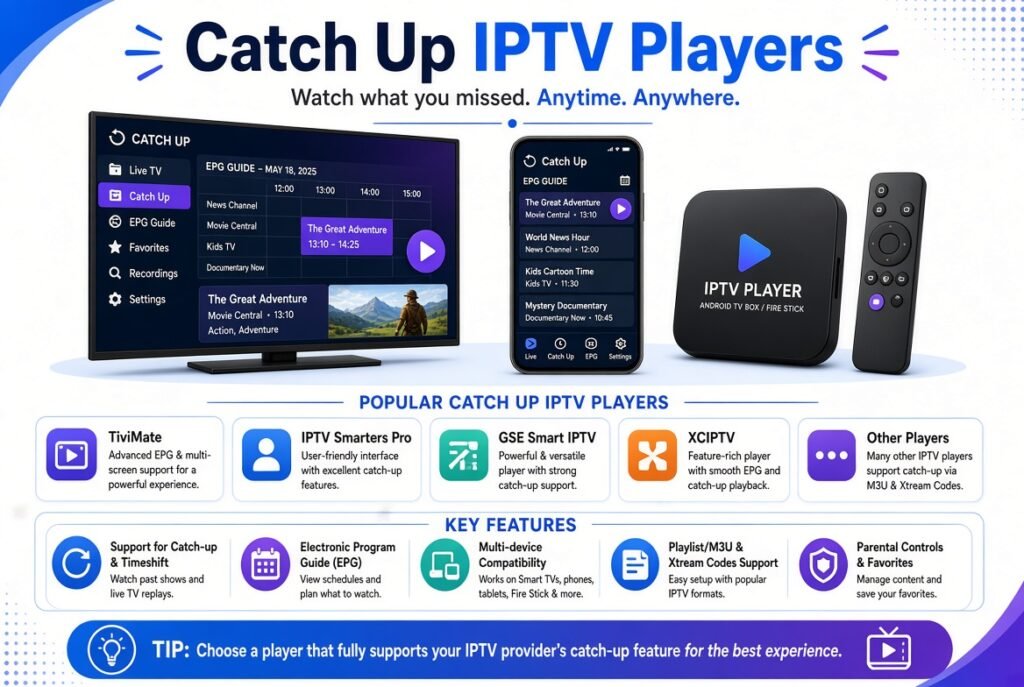
Not every IPTV player handles Catch Up in exactly the same way.
Some players can display previous programs directly from the EPG, while others may require specific playlist or account information.
Common platforms where users may look for Catch Up support include:
- Android
- Android TV
- Smart TV
- Firestick
- Samsung TV
- LG TV
- Google TV
- IPTV set-top boxes
- MAG-compatible systems
- IPTV applications
Popular IPTV players may also provide different Catch Up interfaces and settings.
Catch Up on TiviMate
Users searching for Catch Up on TiviMate generally want to know how to access previously broadcast programs through the EPG.
If the IPTV service provides the required Catch Up information and the playlist is configured correctly, supported programs may be accessible from the TV guide.
Catch Up on IPTV Smarters
IPTV Smarters users may also look for Catch Up functionality.
The important point is that the application itself does not create Catch Up content. The IPTV service must provide the required data and streams.
Catch Up IPTV on Android
Android devices are commonly used for IPTV streaming.
To use Catch Up IPTV on Android:
- Install a compatible IPTV player.
- Add your legitimate IPTV service credentials or playlist.
- Allow the playlist and EPG information to load.
- Open the TV Guide.
- Select a previously broadcast program.
- Look for a replay or Catch Up option.
- Start playback if the program is available.
Catch Up IPTV on Smart TV
On a Smart TV, the process depends on the IPTV player installed on the television.
A typical setup is:
- Install a compatible IPTV application.
- Add your IPTV playlist or supported account.
- Load the EPG.
- Open the TV Guide.
- Select a previous program.
- Start Catch Up playback.
The exact menu names can vary between Samsung, LG, Android TV, Google TV, and other platforms.
Catch Up IPTV on Firestick
Catch Up IPTV on Firestick works through a compatible IPTV player.
The general process is:
- Install a compatible IPTV player.
- Add your IPTV account or playlist.
- Load the EPG.
- Open the TV Guide.
- Select an available previous program.
- Start playback.
If Catch Up is missing, the problem may be related to the IPTV service, playlist, EPG, or player rather than the Firestick itself.
Catch Up IPTV on Samsung and LG TV
For Samsung TV and LG TV, Catch Up availability depends heavily on the IPTV application and service.
If your IPTV player supports Catch Up, you normally access it through the EPG.
If previous programs appear in the guide but cannot be played, check the service configuration and playlist information.
Common Catch Up IPTV Problems
Catch Up TV can sometimes fail even when Live TV works correctly.
Here are the most common issues.
Catch Up IPTV Not Working
If Catch Up IPTV is not working, first check whether the service actually supports Catch Up.
Then:
- Refresh the playlist.
- Refresh the EPG.
- Restart the IPTV player.
- Check your internet connection.
- Try another supported program.
- Update the IPTV application.
- Check whether the Catch Up period has expired.
Catch Up TV Not Working
If Catch Up TV suddenly stops working, the issue may be on the service side.
Possible causes include:
- Server problems
- Expired Catch Up content
- Incorrect EPG information
- Playlist synchronization issues
- Application compatibility
- Internet problems
IPTV Catch Up Not Loading
If Catch Up keeps loading, check your connection speed and latency.
You can also:
- Restart the router.
- Restart the streaming device.
- Clear the IPTV application’s cache.
- Reload the playlist.
- Reload the EPG.
- Test another program.
- Test another IPTV player.
Catch Up IPTV Buffering
Catch Up IPTV buffering can have several causes.
The most common include:
- Weak Wi-Fi
- Network congestion
- High server load
- Long distance from the streaming server
- Poor CDN performance
- Device limitations
- Incorrect video playback settings
Using a stable internet connection, preferably Ethernet where practical, can improve streaming reliability.
Catch Up IPTV Playback Error
A Catch Up IPTV playback error may occur when the player cannot access the replay stream.
Possible reasons include:
- Expired stream
- Incorrect URL
- Server issue
- Unsupported format
- Authentication problem
- EPG mismatch
- Player compatibility issue
Try another available program to determine whether the problem affects one item or the entire Catch Up service.
Catch Up IPTV Freezing
If Catch Up repeatedly freezes, determine whether Live TV and VOD work correctly.
If everything else works normally, the issue may be specific to the Catch Up server or replay stream.
If Live TV, VOD, and Catch Up all freeze, your network or device may be responsible.
Catch Up TV on Your Phone
Many users ask: “Can I watch Catch Up TV on my phone?”
Yes, Catch Up can be available on smartphones when the IPTV player and service support the feature.
The general requirements are:
- Compatible IPTV player
- Valid IPTV service
- Catch Up support
- EPG data
- Stable internet connection
Android and iOS support depends on the IPTV application you choose.
Catch Up TV App
A Catch Up TV app can provide access to previously broadcast programs through a dedicated streaming interface.
However, it is important to understand the difference between an IPTV player and an IPTV provider.
An IPTV player generally provides the software used to play content. It does not necessarily provide the content itself.
Your IPTV provider or service must supply the necessary streams and Catch Up functionality.
How to Watch Catch Up TV
The basic process is simple:
- Choose an IPTV service that supports Catch Up.
- Use a compatible IPTV player.
- Add your authorized IPTV account or playlist.
- Load the EPG.
- Open the TV Guide.
- Find a previous program.
- Select the Catch Up or replay option.
- Start watching.
The available replay period can vary from one service to another.
How Can I Get Catch Up TV?
To get Catch Up TV, you need a service that explicitly supports the feature.
Before choosing an IPTV service, check:
- Catch Up availability
- EPG support
- Supported devices
- Replay duration
- Streaming quality
- Player compatibility
- Customer support
- Connection reliability
Not all IPTV providers offer the same Catch Up functionality.
Catch Up TV vs DVR
DVR normally refers to recording television programs so they can be watched later.
Catch Up TV is different because the service generally makes previously broadcast content available without requiring you to manually record it.
Catch Up TV
- Provider-managed replay
- Usually integrated with EPG
- No manual recording required
- Availability depends on the service
DVR
- User or system records content
- Storage may be required
- Recording schedules can be configured
- Playback depends on the recorded file
Catch Up IPTV and Streaming Technology
Behind the scenes, Catch Up TV can involve several technologies.
These may include:
- HLS Streaming
- HTTP-based video delivery
- Streaming servers
- CDN infrastructure
- EPG systems
- IPTV APIs
- M3U playlists
- Xtream Codes
- Video storage
- Time-shifting systems
A CDN can help distribute video content closer to viewers, potentially improving performance and reducing latency.
Catch Up TV and IPTV CDN
An IPTV CDN can be an important part of large-scale streaming infrastructure.
Instead of every viewer connecting directly to a single origin server, content can be distributed through edge servers.
This architecture can help with:
- Scalability
- Traffic distribution
- Faster content delivery
- Reduced origin-server load
- Improved streaming stability
However, a CDN alone cannot guarantee perfect IPTV playback. Server configuration, network quality, encoding, device performance, and the IPTV service itself also matter.
Tips for a Better Catch Up IPTV Experience
For the best experience:
- Use a stable internet connection.
- Prefer Ethernet when possible.
- Keep your IPTV player updated.
- Keep the EPG synchronized.
- Use a compatible device.
- Avoid overloaded Wi-Fi networks.
- Restart the application if playback becomes unstable.
- Test different programs to identify whether the problem is content-specific.
- Choose IPTV services that clearly explain their Catch Up support.
Final Thoughts
Catch Up TV has become an important IPTV feature because it gives viewers more flexibility than traditional Live TV.
Instead of being limited to a fixed broadcast schedule, users can often return to the EPG, select a previous program, and watch it later.
Understanding how Catch Up IPTV, M3U, Xtream Codes, EPG, IPTV Players, Time Shifting, TV Replay, VOD, and CDN technology work together can make troubleshooting much easier.
If Catch Up is not working, start by checking whether the IPTV service supports it, then verify the EPG, playlist, player, internet connection, and server availability. In many cases, the problem can be identified by testing whether Live TV and VOD are working normally.
Most importantly, use IPTV services and content that you are authorized to access and always follow the laws and terms applicable in your region.


