
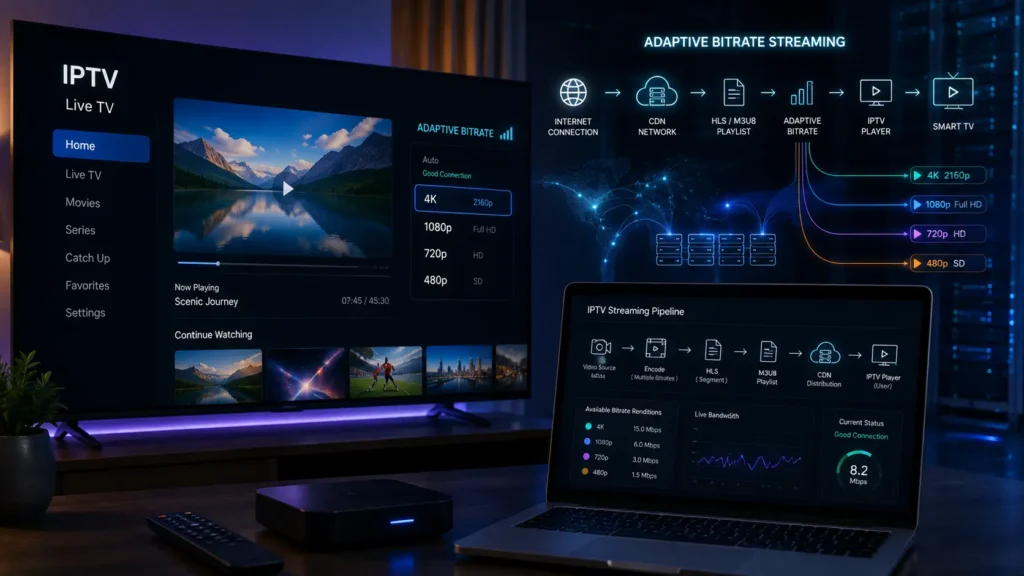
Adaptive Bitrate Streaming (ABR) is one of the most important technologies behind modern video and IPTV streaming. It allows a video stream to automatically adjust its quality according to the viewer’s internet speed, available bandwidth, device performance, and network conditions.
For IPTV users, this can mean smoother playback, fewer interruptions, better picture quality, and less buffering—especially when watching live content over an unstable connection.
In this guide, we’ll explain what Adaptive Bitrate Streaming is, how it works, its connection with HLS and M3U8, and why it is important for IPTV streaming.
What Is Adaptive Bitrate Streaming?

Adaptive Bitrate Streaming, often abbreviated as ABR, is a video streaming technology that dynamically changes the quality of a video while it is playing.
Instead of delivering only one fixed-quality stream, the streaming system prepares multiple versions of the same video at different bitrates and resolutions.
For example:
- 426×240 — Low quality
- 640×360 — SD
- 1280×720 — HD
- 1920×1080 — Full HD
- 3840×2160 — 4K
The IPTV player continuously monitors the network connection and chooses the most appropriate version.
If the internet connection becomes slower, the player can switch to a lower bitrate. When the connection improves, it can move back to a higher-quality stream.
This is why adaptive streaming is particularly useful for IPTV and live video.
How Does Adaptive Bitrate Streaming Work?
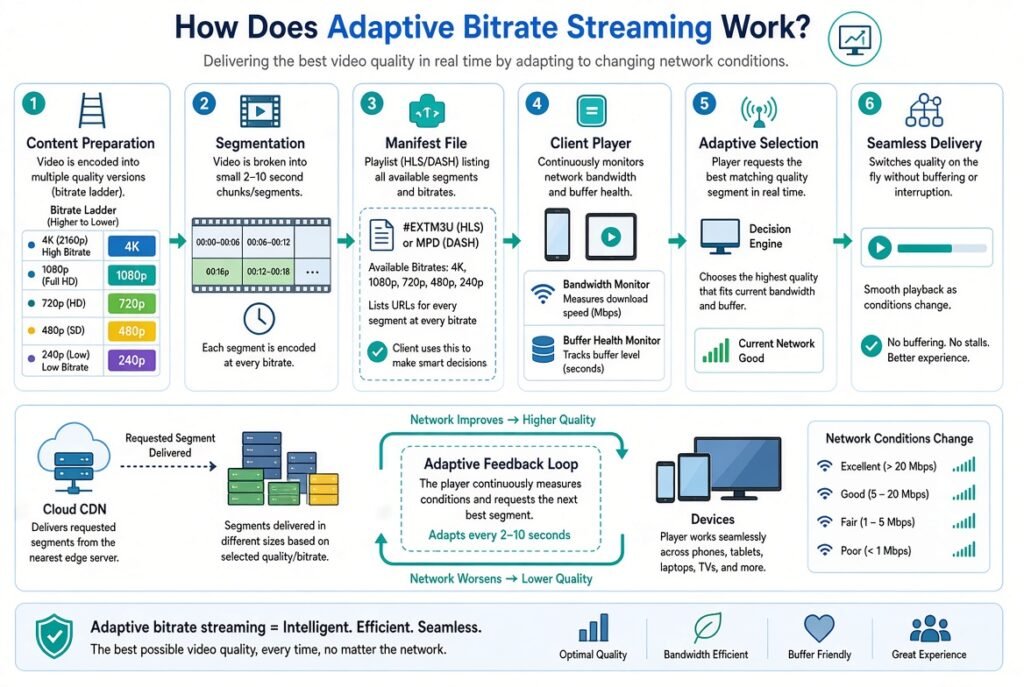
The basic process is relatively simple.
First, the video is encoded into several different quality levels. These versions are then divided into small segments.
The streaming server or CDN makes those segments available to the player.
The IPTV player monitors factors such as:
- Internet bandwidth
- Download speed
- Buffer level
- Device performance
- Current video bitrate
- Network stability
- Latency
Based on these factors, the player selects the appropriate quality.
For example:
Good connection → 1080p
↓
Connection becomes unstable → 720p
↓
Bandwidth drops further → 480p
↓
Connection improves → 1080p
The process happens automatically, usually without requiring the viewer to manually change the video quality.
Adaptive Bitrate Streaming for IPTV
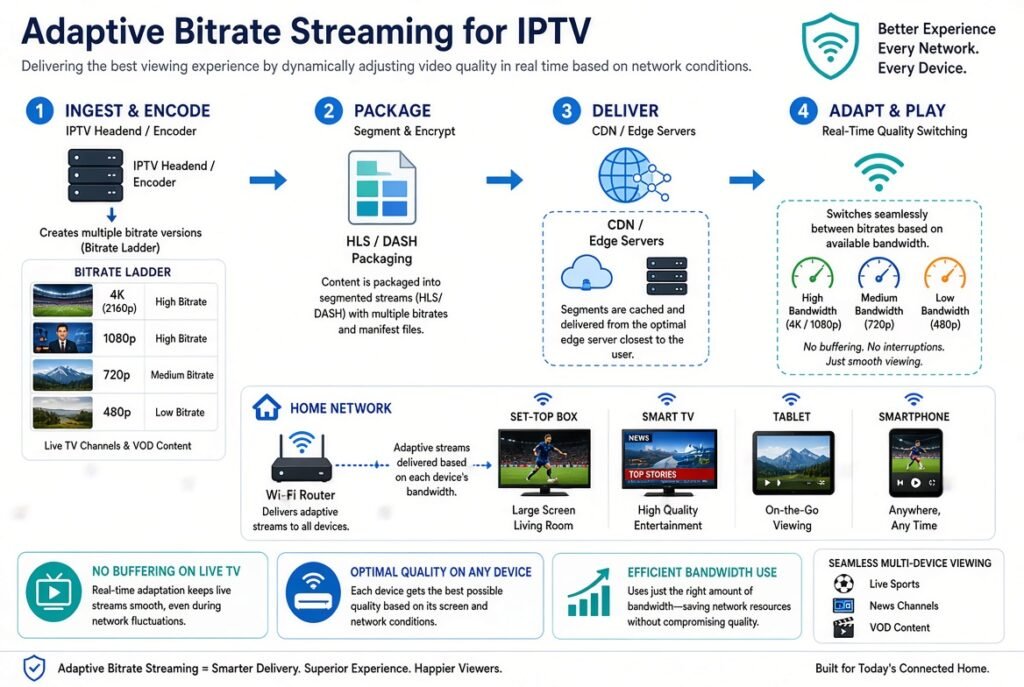
Adaptive bitrate streaming IPTV technology is particularly useful because IPTV users can have very different internet connections and devices.
One viewer might have a fast fiber connection, while another may use Wi-Fi or a mobile connection.
Without adaptive streaming, a fixed high-quality stream could cause frequent buffering when the available bandwidth is insufficient.
With adaptive bitrate IPTV, the player can select a suitable quality level according to current network conditions.
This can improve:
- IPTV streaming quality
- Playback stability
- Buffering performance
- Live streaming reliability
- Smart TV performance
- Mobile streaming
- Overall viewing experience
However, ABR cannot fix every streaming problem. If the source server is overloaded or the network is severely unstable, buffering may still occur.
HLS Adaptive Bitrate Streaming
One of the most common technologies used for adaptive streaming is HLS (HTTP Live Streaming).
HLS was developed by Apple and is widely supported across modern devices and platforms.
An HLS stream commonly uses an M3U8 playlist to tell the player where the different video segments and quality levels are located.
A simplified structure could look like:
Master Playlist│├── 1080p Stream├── 720p Stream├── 480p Stream└── 360p Stream
The player reads the master playlist and determines which version should be played.
This is why the terms HLS adaptive bitrate streaming, M3U8 streaming, and adaptive bitrate HLS are closely connected.
What Is M3U8 in IPTV?
M3U8 is a UTF-8 encoded playlist format commonly used with HLS streaming.
Unlike a simple playlist containing direct media links, an M3U8 file can describe a streaming structure containing multiple quality levels and media segments.
For adaptive streaming, a master M3U8 playlist may point toward different streams:
Master M3U8 ↓1080p M3U8720p M3U8480p M3U8360p M3U8
The IPTV player can then select the appropriate stream.
This makes M3U8 IPTV and HLS particularly relevant when discussing modern adaptive streaming architectures.
Why Is Adaptive Bitrate Important for IPTV?
IPTV streaming depends heavily on network performance.
A stream that works perfectly on a fast fiber connection may struggle on a weaker Wi-Fi connection.
Adaptive streaming provides flexibility by allowing the video quality to change dynamically.
1. Reduces Buffering
One of the biggest advantages is reducing unnecessary buffering.
If bandwidth temporarily drops, the player can switch to a lower bitrate instead of continuing to request a stream that the connection cannot handle.
2. Improves Video Quality
When bandwidth is sufficient, the player can increase the bitrate and deliver higher-quality video.
This means viewers can potentially receive HD or 4K quality when their connection supports it.
3. Better Live Streaming
Adaptive live streaming is especially important for live IPTV because viewers cannot simply pause and wait for the entire video to download.
The system must deliver content continuously.
4. Works Across Different Devices
Adaptive streaming can work across many devices, including:
- Smart TVs
- Android TV
- Fire TV devices
- Smartphones
- Tablets
- Computers
- Streaming boxes
Adaptive Bitrate Streaming and IPTV Buffering
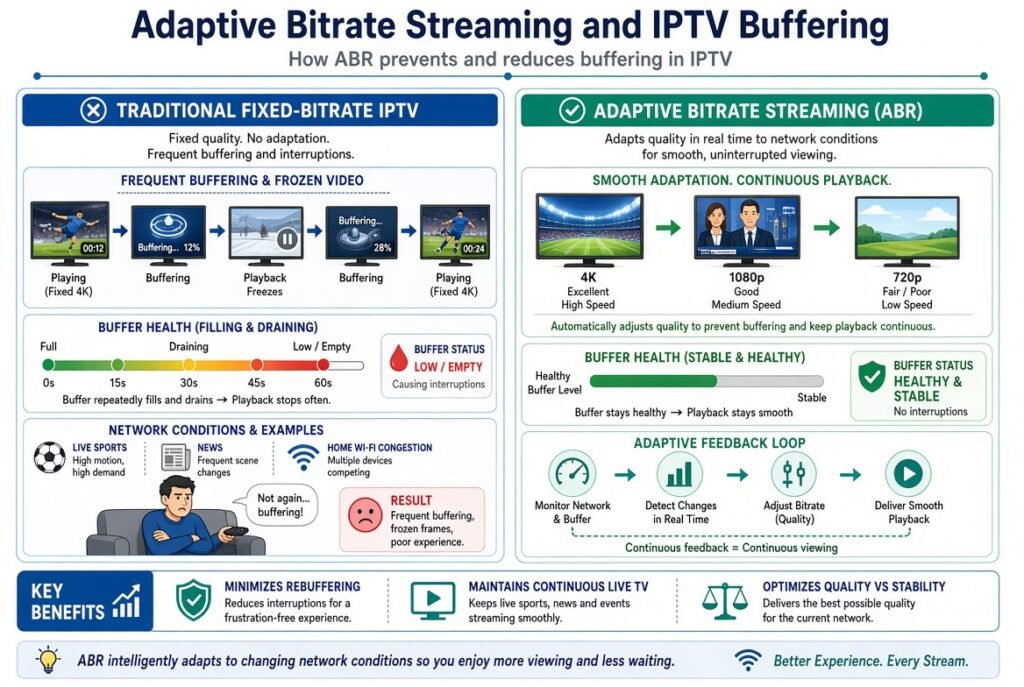
IPTV buffering can have many causes, and adaptive bitrate streaming is only one part of the solution.
Common causes include:
- Slow internet connection
- Wi-Fi interference
- Network congestion
- High latency
- Server overload
- Poor CDN performance
- Insufficient bandwidth
- Device limitations
- Incorrect player configuration
ABR can help when the problem is related to changing network bandwidth.
For example, if a viewer is watching a high-bitrate stream and their available bandwidth suddenly decreases, adaptive streaming can switch to a lower bitrate.
This can prevent the player from exhausting its buffer.
IPTV Streaming Optimization
A good IPTV streaming infrastructure normally involves more than just a video server.
A modern architecture can include:
Video Source → Encoding → Origin Server → CDN → Internet → IPTV Player → Smart TV
Each component has an important role.
Encoding
The video is encoded into multiple resolutions and bitrates.
Origin Server
The original streaming content is stored or generated here.
CDN
A Content Delivery Network distributes content through geographically distributed edge servers.
IPTV Player
The player receives the stream and determines which quality level to request.
This combination creates an optimized streaming environment.
Adaptive Live Streaming
Live streaming presents additional challenges because the content is being generated in real time.
The system must encode and distribute multiple quality levels quickly.
For example:
Live Source ↓Encoder ↓Multiple Bitrates ↓CDN ↓IPTV Player ↓Smart TV
The player can then dynamically select the appropriate bitrate.
This is particularly useful for live events, where a large number of viewers may access the stream simultaneously.
Adaptive Bitrate Streaming and CDN
A CDN for streaming can significantly improve content delivery by serving video segments from edge locations closer to viewers.
Instead of every viewer connecting directly to a single origin server, the CDN distributes content across multiple edge servers.
This can help with:
- Latency
- Scalability
- Bandwidth distribution
- Streaming reliability
- Global content delivery
For IPTV platforms serving users in different geographic regions, CDN infrastructure can be especially important.
Low Bitrate vs High Bitrate
Bitrate determines how much data is delivered per second.
A higher bitrate generally allows more visual detail, but it also requires more bandwidth.
For example:
| Quality | Typical Bitrate Range |
|---|---|
| 360p | ~0.5–1 Mbps |
| 480p | ~1–2.5 Mbps |
| 720p | ~2–5 Mbps |
| 1080p | ~4–10+ Mbps |
| 4K | ~15–30+ Mbps |
These are illustrative ranges rather than universal requirements. Actual bitrate depends on the codec, frame rate, content complexity, and encoding settings.
Adaptive Bitrate vs Fixed Bitrate Streaming
The difference is straightforward.
Fixed Bitrate Streaming
A single quality level is delivered.
Advantages:
- Simple architecture
- Predictable bitrate
- Easier to configure
Disadvantages:
- Can buffer when bandwidth drops
- Doesn’t adapt to network changes
- May waste bandwidth when the connection is faster than necessary
Adaptive Bitrate Streaming
Multiple quality levels are available.
Advantages:
- Automatically adjusts quality
- Better for changing networks
- Can reduce buffering
- Better for mobile and Wi-Fi connections
- Suitable for live streaming
For modern IPTV streaming, adaptive bitrate is generally much more flexible.
Common Adaptive Streaming Problems
Even with ABR, users can experience problems.
IPTV Quality Keeps Changing
This usually means the player is switching between available bitrate levels because network conditions are changing.
IPTV Keeps Buffering
Possible causes include:
- Insufficient bandwidth
- Server congestion
- Poor Wi-Fi
- CDN problems
- High latency
M3U8 Playback Error
An M3U8 error may be caused by:
- Invalid playlist
- Expired URL
- Server problem
- Unsupported codec
- Network restrictions
- Player compatibility issues
HLS Stream Not Working
Check:
- Whether the M3U8 URL is valid.
- Whether the player supports HLS.
- Whether the server is online.
- Whether the device has a stable connection.
- Whether the stream requires authentication.
Best Service for Adaptive Bitrate Streaming: What to Look For
When evaluating an IPTV or streaming service, don’t focus only on advertised resolution.
Look at the underlying streaming infrastructure.
Important factors include:
- Adaptive bitrate support
- HLS support
- M3U8 compatibility
- Reliable streaming servers
- CDN infrastructure
- Stable playback
- Low latency
- Device compatibility
- Good customer support
- Proper EPG integration
- Reliable video delivery
A service offering “4K” does not automatically mean that every stream will consistently play at 4K. Your connection, device, server, encoding quality, and network conditions all matter.
How to Improve IPTV Streaming Quality
If your IPTV stream frequently buffers or changes quality, try these practical steps:
Use a Stable Internet Connection
Ethernet is generally more stable than Wi-Fi for stationary Smart TVs and streaming boxes.
Check Your Network Speed
Make sure your connection has enough available bandwidth for the desired video quality.
Reduce Network Congestion
Other devices downloading large files or streaming simultaneously can reduce available bandwidth.
Update Your IPTV Player
Older players may have compatibility or playback issues.
Use a Supported Streaming Format
Modern players commonly support formats such as HLS and M3U8, but compatibility varies between applications and devices.
Check Server and CDN Performance
If several devices experience the same issue simultaneously, the problem may be upstream rather than on your home network.
Adaptive Bitrate Streaming for Smart TVs and Firestick
Modern streaming devices can benefit significantly from adaptive streaming.
For example, users watching IPTV on:
- Amazon Fire TV / Firestick
- Samsung Smart TV
- LG Smart TV
- Android TV
- Google TV
- Android smartphones
- iPhone and iPad
- IPTV streaming boxes
may experience changing network conditions.
ABR allows compatible players to respond to those changes automatically.
The Future of IPTV Streaming
Streaming technology continues to evolve toward higher quality, lower latency, and more efficient delivery.
Important technologies include:
- Adaptive Bitrate Streaming
- HLS
- M3U8
- MPEG-DASH
- Low-latency streaming
- CDN edge delivery
- Modern video codecs
- Cloud streaming infrastructure
- Real-time streaming
- Advanced video compression
Together, these technologies make it possible to deliver increasingly high-quality video while supporting viewers with very different network conditions.
Final Thoughts
Adaptive Bitrate Streaming is a fundamental technology for modern IPTV and video streaming. Instead of forcing every viewer to use the same quality, ABR dynamically selects the most appropriate bitrate based on current conditions.
Its combination with HLS, M3U8, CDN infrastructure, streaming servers, and modern IPTV players can provide a smoother and more reliable viewing experience.
For IPTV users, the key takeaway is simple:
Better streaming isn’t only about having a fast internet connection. The quality of the streaming infrastructure and its ability to adapt to changing network conditions also matters.
When evaluating an IPTV streaming solution, look beyond claims such as “HD” or “4K” and consider adaptive bitrate support, HLS/M3U8 compatibility, CDN performance, server reliability, latency, and overall streaming quality.


