
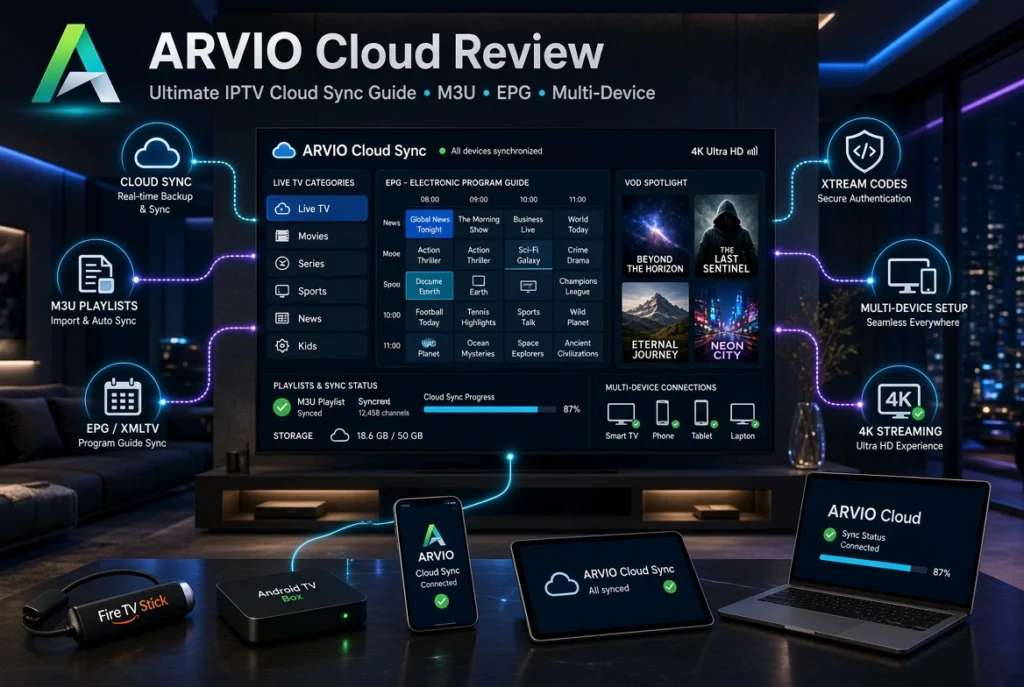
Managing IPTV across multiple devices can quickly become frustrating. You may have to add the same playlist again, recreate favorites, configure EPG settings, and repeat the process whenever you replace a TV or add another device.
This is where ARVIO Cloud becomes interesting.
ARVIO is more than a traditional IPTV player. It is an open-source media hub with IPTV playlist support, profiles, integrations, and an optional cloud synchronization system designed to keep supported information aligned across compatible devices. ARVIO currently supports IPTV sources such as M3U and Xtream and explicitly states that it does not provide or distribute IPTV subscriptions, channels, or streams.
In this guide, we’ll take a detailed look at ARVIO Cloud, how its cloud sync works, ARVIO Cloud login, IPTV setup, M3U, Xtream Codes, EPG, multi-device synchronization, privacy, troubleshooting, and how it compares with other IPTV players that offer cloud or backup features.
Important: ARVIO is a media-management/player application. It does not provide IPTV subscriptions or channels. Only connect playlists, services, and media that you own or are legally authorized to access.
What Is ARVIO Cloud?
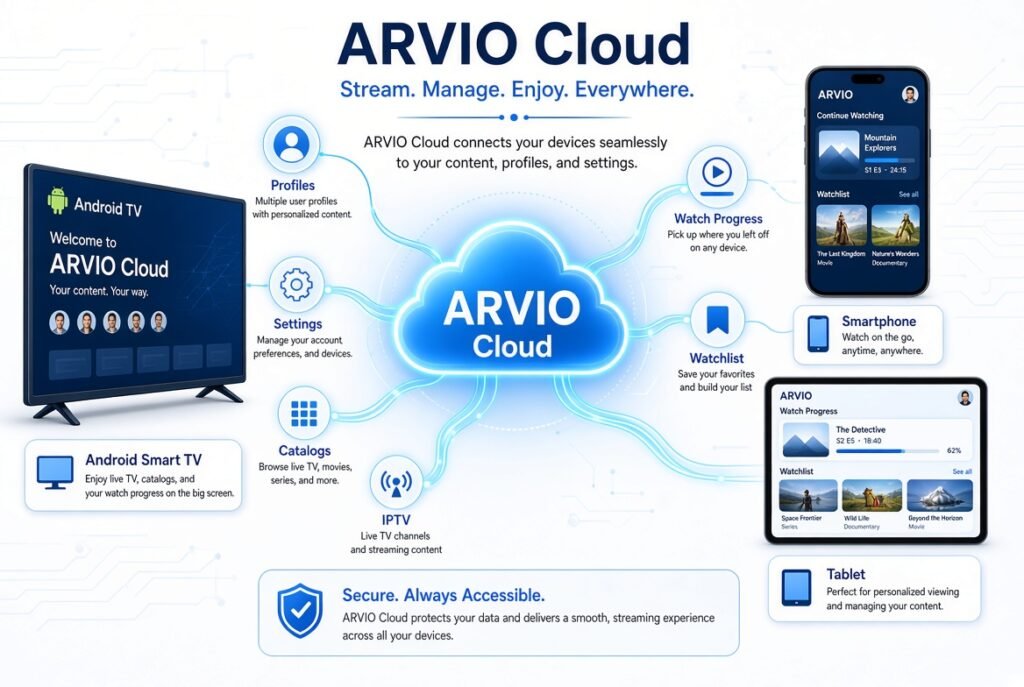
ARVIO Cloud is the optional cloud service associated with ARVIO that allows supported profiles, settings, catalogs, IPTV state, and watch-related information to be synchronized between compatible devices.
The main idea is simple:
Set up once → Pair your devices → Sync supported data → Reduce repetitive configuration
ARVIO’s official website describes Cloud Sync as a way to pair devices using a QR code and synchronize profiles, addons, catalogs, and settings without having to type passwords on a TV.
The current ARVIO documentation also describes synchronization of information such as:
- Profiles
- Settings
- Catalogs
- Live TV state
- Watch state
- Profile avatars
- Supported IPTV configuration
This makes ARVIO Cloud particularly interesting for users who use IPTV and media applications on more than one screen.
Why ARVIO Cloud Matters for IPTV
Traditional IPTV players often treat every device as a separate installation.
For example, if you have three Android TV devices, you may need to configure each one independently.
That can mean repeatedly entering:
- M3U URLs
- Xtream Codes credentials
- EPG settings
- Favorites
- Categories
- Playback preferences
Cloud synchronization changes the workflow.
Instead of configuring every device independently, supported information can be associated with your ARVIO Cloud account and synchronized between paired devices.
The Main Benefits
The biggest benefits include:
- Less repetitive setup
- Easier device replacement
- Centralized profiles
- Cross-device settings
- IPTV state synchronization
- Watch-state synchronization
- QR-based pairing
- Easier multi-device management
For people using several TVs, this can be a meaningful improvement in everyday usability.
How Does ARVIO Cloud Sync Work?
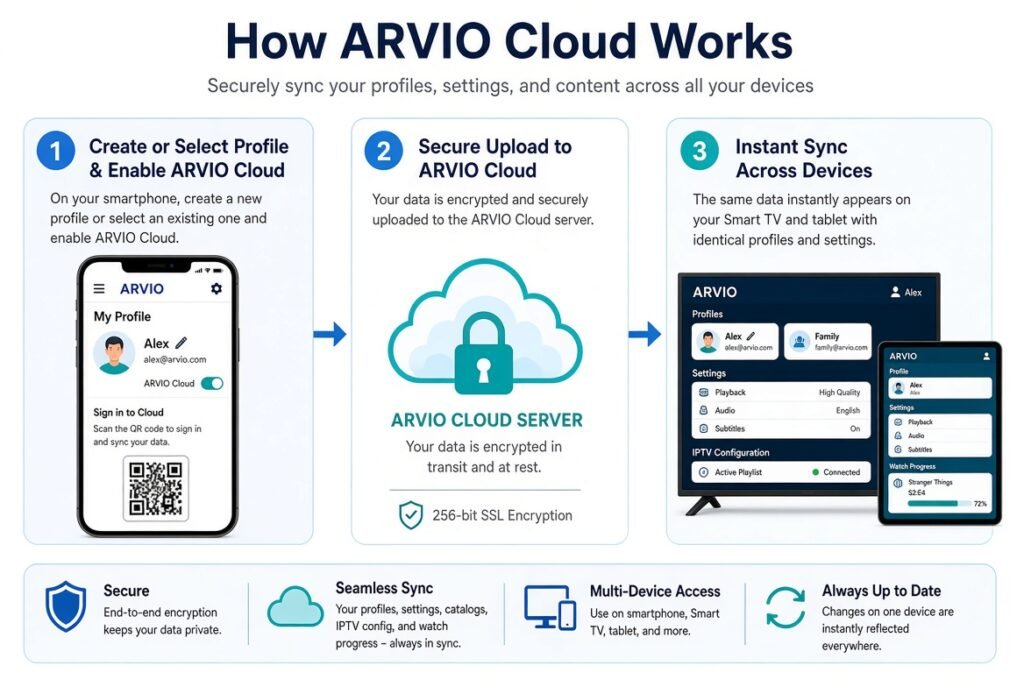
ARVIO uses a pairing process designed to make connecting a TV to your cloud account easier.
The basic workflow is:
ARVIO device → QR code → ARVIO Cloud account → synchronized data
According to ARVIO’s current setup instructions, you can go to the account/cloud section in ARVIO, scan the QR code with your phone, and pair the TV.
ARVIO Cloud Pairing Process
A typical setup looks like this:
- Install ARVIO on a compatible device.
- Open the ARVIO settings.
- Find the account or ARVIO Cloud section.
- Display the pairing QR code.
- Scan the QR code using your phone.
- Sign in or create an ARVIO Cloud account.
- Pair the device.
- Enable the information you want to synchronize.
- Repeat the pairing process on additional compatible devices.
The exact interface can change between versions, so users should follow the current instructions displayed inside their ARVIO installation.
ARVIO Cloud Login
ARVIO Cloud Login is one of the most useful search intents around the platform.
The current ARVIO account page provides several authentication options, including email and password, as well as pairing-code functionality. When the account page is opened through a TV QR code, the login process can automatically pair that TV.
How to Login to ARVIO Cloud
The general process is:
- Open ARVIO.
- Go to Settings.
- Select Accounts.
- Choose ARVIO Cloud.
- Select the QR or account login option.
- Scan the QR code or enter your account credentials.
- Complete the pairing process.
- Return to your TV.
You should never share your ARVIO password or cloud credentials publicly.
Do You Need an ARVIO Cloud Account?
No, cloud synchronization is optional.
ARVIO’s documentation states that an ARVIO Cloud account is optional. If you don’t need synchronization, you can use ARVIO without creating a cloud account.
This is useful for users who prefer keeping their setup local.
ARVIO IPTV Player
ARVIO can function as an IPTV player and media hub, rather than simply being a basic channel player.
Its current project documentation lists IPTV support for:
- M3U playlists
- Xtream sources
- Provider categories
- Favorites
- Hidden categories
- EPG
- Mobile/tablet playback
This gives ARVIO a broader feature set than a simple M3U playback application.
ARVIO M3U Support
ARVIO M3U is an important part of its IPTV functionality.
M3U is a playlist format commonly used to organize IPTV streams. Instead of providing channels itself, ARVIO allows users to connect their own authorized M3U source.
The general concept is:
M3U URL → ARVIO → Playlist → Categories → Playback
How to Add M3U to ARVIO
The exact menu names can change with releases, but the general workflow is:
- Open ARVIO.
- Navigate to IPTV or Live TV settings.
- Choose the option to add a playlist.
- Select M3U.
- Enter your authorized M3U URL.
- Save the playlist.
- Allow ARVIO to process the playlist.
- Open Live TV and verify the available categories.
If the playlist is valid, ARVIO can organize supported channel information into the IPTV interface.
ARVIO Xtream Codes
ARVIO also supports Xtream Codes sources according to its current project documentation.
Xtream Codes generally uses three pieces of information:
- Server URL
- Username
- Password
This can be more convenient than manually handling a long M3U URL when your authorized IPTV service provides Xtream credentials.
M3U vs Xtream Codes on ARVIO
| Feature | M3U | Xtream Codes |
|---|---|---|
| Playlist URL | Yes | Not normally required |
| Username | Usually embedded in URL | Yes |
| Password | Usually embedded in URL | Yes |
| Live TV | Supported source format | Supported source format |
| EPG | Depends on source | Depends on service/API |
| VOD | Depends on playlist | Depends on source |
| Setup | Usually URL-based | Server + username + password |
The important point is that ARVIO is a player, not the provider of these credentials.
ARVIO EPG
ARVIO EPG is another important IPTV feature.
EPG stands for Electronic Program Guide. It provides program information alongside compatible live-TV streams.
A useful EPG can show:
- Current program
- Next program
- Program schedules
- Channel information
- Program descriptions
ARVIO’s current feature documentation specifically lists EPG support alongside its IPTV M3U/Xtream functionality.
Why EPG Matters
Without EPG information, an IPTV playlist may simply present a long list of channels.
With an EPG, the interface becomes much easier to navigate because you can understand what is currently playing and what is coming next.
This is particularly useful when you have a large playlist.
ARVIO Cloud and Multi-Device Sync
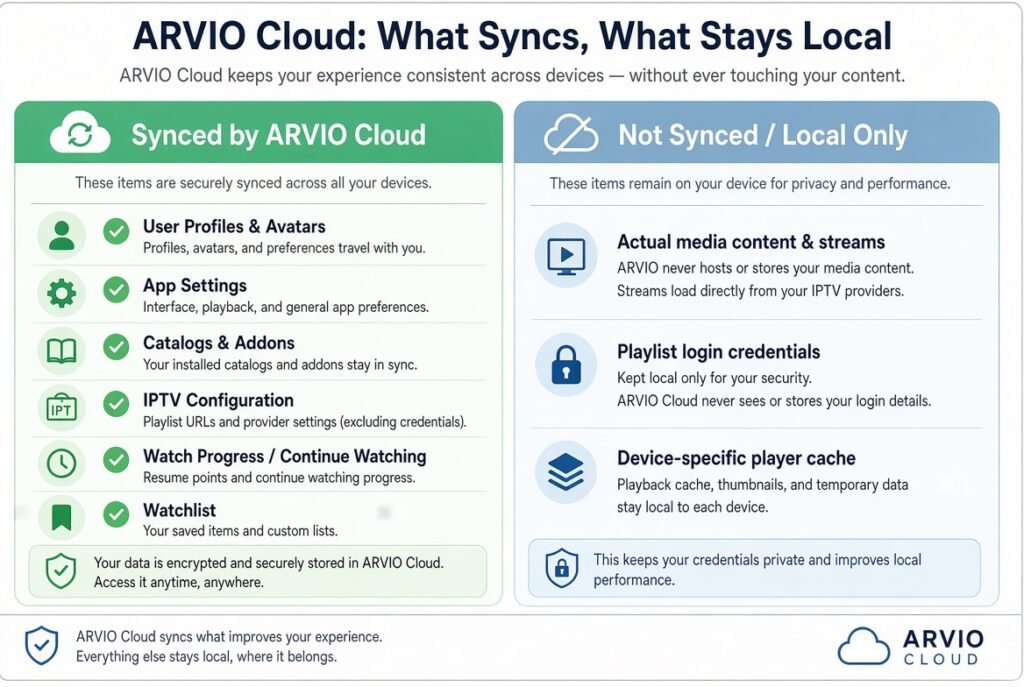
One of the strongest reasons to use ARVIO Cloud is multi-device management.
Imagine having:
- Android TV in the living room
- Fire TV in the bedroom
- Android tablet
- Android phone
Instead of manually rebuilding your environment on every compatible installation, cloud synchronization can keep supported ARVIO information aligned.
What Can ARVIO Cloud Sync?
According to ARVIO’s current documentation, synchronization can include:
- Profiles
- Settings
- Catalogs
- Live TV state
- Watch state
- Profile avatars
The exact information available can depend on the current ARVIO version and configuration.
ARVIO Profile Sync
Profiles are useful when several people use the same media environment.
For example, you could have:
Profile 1: Adult
Profile 2: Kids
Profile 3: Guest
ARVIO’s documentation describes separate profiles with individual home screens and different watch histories.
This can make a shared TV setup much easier to organize.
ARVIO Watch State Sync
ARVIO Watch State is another useful cloud feature.
Watch state can include information related to where you are in supported content or what you have recently watched.
This creates a more consistent experience when moving between devices.
For example:
TV A → Watch content → Cloud → TV B → Continue
The exact behavior depends on the content source and integration being used.
ARVIO Cloud Backup vs Cloud Sync
Cloud sync and backup are related, but they are not identical.
Cloud Sync
Cloud sync aims to keep supported information available across connected devices.
Cloud Backup
Cloud backup is primarily intended to preserve a copy of configuration data so it can be restored later.
A useful way to think about the difference is:
Sync = Keep devices aligned
Backup = Keep a recoverable copy
ARVIO’s current documentation uses the concept of cloud backup alongside its cloud pairing and synchronization functionality.
ARVIO on Android TV
ARVIO is particularly focused on the Android TV/media-hub experience.
Its current project documentation lists support for:
- Android TV
- Fire TV
- Android phones
- Android tablets
This makes it a natural option for users who primarily watch IPTV through TV-oriented Android devices.
ARVIO Web
Another interesting part of the ARVIO ecosystem is ARVIO Web.
The official project currently describes browser-based access for devices such as:
- Windows
- Mac
- iPhone
- iPad
- Chromebook
with supported information synchronized through ARVIO Cloud.
This can make ARVIO more flexible than an IPTV player that only exists on a single TV platform.
ARVIO Cloud and Privacy
Privacy is particularly important when cloud synchronization is involved.
An IPTV setup can potentially contain sensitive information such as:
- Playlist URLs
- Account identifiers
- IPTV credentials
- User profiles
- Viewing information
ARVIO states that creating a cloud account stores your email, a password hash, and the profiles/settings you choose to synchronize.
Therefore, users should understand what they are synchronizing before enabling the feature.
Privacy Best Practices
For better security:
- Use a strong unique password.
- Don’t share IPTV credentials.
- Don’t publish M3U URLs.
- Avoid screenshots containing login details.
- Only use legitimate IPTV sources.
- Review the application’s privacy information.
- Remove devices you no longer use.
- Keep your software updated.
Is ARVIO Cloud Safe?
There is no simple “yes” or “no” answer for every user.
The important question is what data you choose to synchronize and whether you trust the service handling that data.
ARVIO makes cloud synchronization optional, which gives users the choice to keep their setup local. Its account page also explicitly explains that cloud accounts store the email and cloud data selected for synchronization.
For privacy-conscious users, understanding these permissions is more important than simply seeing the word “Cloud.”
ARVIO Cloud vs Other IPTV Players
ARVIO is not the only IPTV application exploring synchronization.
Several IPTV players now offer some form of cloud sync, backup, or restore.
ARVIO vs IPTV One
IPTV One puts cross-platform cloud synchronization at the center of its product.
Its current website says one account can synchronize supported favorites, history, playback position, playlists, EPG configuration, and settings across platforms including Android, iOS, Windows, macOS, Linux, Apple TV, Fire TV, and Android TV.
ARVIO, by comparison, is more of a broader open-source media hub with optional cloud synchronization and integrations.
Choose ARVIO if: you want an open-source media hub with IPTV and broader integrations.
Choose IPTV One if: your priority is a dedicated multi-platform IPTV player with account-based cloud synchronization.
ARVIO vs TiviMate
TiviMate is well known among Android TV IPTV users and focuses heavily on the IPTV-player experience.
Its strength is its TV-oriented interface and IPTV organization.
ARVIO takes a broader approach by combining IPTV with profiles, media management, integrations, and optional cloud synchronization.
Choose ARVIO if: you want IPTV plus a broader media-management environment.
Choose TiviMate if: you primarily want a dedicated Android TV IPTV interface.
ARVIO vs CloudStream
CloudStream also provides IPTV functionality and supports M3U/Xtream sources. Its current Google Play listing advertises backup and restore, optional Google Drive backup, QR pairing, and synchronization features.
The major distinction is that CloudStream emphasizes IPTV playback and configuration, while ARVIO combines IPTV with a wider media-hub ecosystem.
Best IPTV Players With Cloud Sync
If your primary requirement is cloud synchronization, these applications are worth comparing:
| IPTV Player | Cloud / Sync Approach | IPTV | M3U | Xtream | EPG | Multi-Device Focus |
|---|---|---|---|---|---|---|
| ARVIO | ARVIO Cloud | ✓ | ✓ | ✓ | ✓ | High |
| IPTV One | Account-based cloud sync | ✓ | ✓ | ✓ | ✓ | Very High |
| TiviMate | Backup/restore focused | ✓ | ✓ | ✓ | ✓ | Android-focused |
| CloudStream | Sync + backup/restore | ✓ | ✓ | ✓ | ✓ | Good |
Features can change between app versions and platforms, so always verify the current release before relying on a particular synchronization feature.
How to Choose an IPTV Player With Cloud Sync
Before choosing an IPTV player, don’t simply look for the phrase “Cloud Sync.”
Ask these questions instead.
Does It Sync Playlists?
If you’re using multiple devices, playlist synchronization can save a lot of time.
Does It Sync Favorites?
This is particularly useful if you have customized a large channel list.
Does It Sync Watch History?
This matters more for VOD and other supported on-demand content.
Does It Sync Settings?
Check whether your playback and interface preferences are synchronized.
Does It Support Your Devices?
A cloud feature is less useful if your TV or streaming device isn’t supported.
Is Backup Available?
Cloud synchronization is convenient, but a dedicated backup option can provide an additional recovery mechanism.
Common ARVIO Cloud Problems
Even a well-designed synchronization system can encounter issues.
ARVIO Cloud Login Not Working
If you cannot sign in:
- Check your email and password.
- Verify that your internet connection works.
- Try the QR/pairing method.
- Check whether the ARVIO service is available.
- Update ARVIO if an update is available.
ARVIO Cloud Sync Not Working
First verify that:
- You are using the same account.
- Cloud synchronization is enabled.
- The devices are properly paired.
- Both devices have internet access.
- The ARVIO versions are compatible.
- The data you’re expecting is actually included in cloud synchronization.
ARVIO IPTV Not Working
If IPTV itself isn’t working, cloud sync may not be the cause.
Check:
- Playlist URL
- Xtream credentials
- Server availability
- Internet connection
- EPG configuration
- Playlist expiration
- Device compatibility
Remember that ARVIO does not operate the IPTV server supplying your playlist.
ARVIO M3U Not Working
If an M3U playlist fails:
- Confirm that the URL is correct.
- Test whether the playlist is still active.
- Check your network.
- Verify that the source is compatible.
- Re-add the playlist if necessary.
Cloud synchronization cannot repair an expired or unavailable M3U source.
ARVIO EPG Not Working
If the EPG is missing:
- Verify the EPG source.
- Check playlist-to-EPG mapping.
- Refresh the guide.
- Confirm that the source provides valid guide information.
- Check whether the issue affects one playlist or all playlists.
ARVIO Cloud: Pros and Cons
Pros
- Optional cloud synchronization
- QR-based device pairing
- IPTV M3U support
- Xtream support
- EPG support
- Profiles
- Watch-state synchronization
- Android TV and Fire TV support
- Open-source project
- Broader media integrations
Cons
- Cloud sync is optional rather than mandatory.
- Some features can vary by platform.
- Users need to understand exactly what data is synchronized.
- It is not an IPTV provider.
- IPTV performance still depends on the source, network, and device.
- Cloud synchronization cannot fix an unreliable IPTV server.
Who Should Use ARVIO Cloud?
ARVIO Cloud makes the most sense for users who:
- Have multiple compatible devices.
- Want to avoid repetitive configuration.
- Want synchronized profiles.
- Use IPTV and other media integrations.
- Prefer an Android TV-oriented media hub.
- Want optional rather than mandatory cloud synchronization.
- Value an open-source project.
It may be less important if you only use one device and rarely change your IPTV configuration.
ARVIO Cloud Setup Checklist
Before you start, make sure you have:
- A compatible ARVIO installation
- Internet access
- An ARVIO Cloud account if you want synchronization
- Your own authorized M3U or Xtream information
- EPG information if your source requires it
- Access to the devices you want to pair
Then:
Install → Create Profile → Pair ARVIO Cloud → Add IPTV → Configure EPG → Test Playback → Pair Additional Devices
This workflow keeps the setup organized and reduces unnecessary troubleshooting.
Frequently Asked Questions
What is ARVIO Cloud?
ARVIO Cloud is the optional cloud synchronization system for ARVIO. It can synchronize supported profiles, settings, catalogs, IPTV state, and watch-related information between paired devices.
Is ARVIO an IPTV provider?
No. ARVIO is software for media management and playback. It does not host, sell, or distribute IPTV channels, playlists, or subscriptions.
Does ARVIO support M3U?
Yes. ARVIO’s current project documentation lists IPTV M3U playlist support.
Does ARVIO support Xtream Codes?
Yes. Xtream playlist/source support is listed among ARVIO’s IPTV features.
Does ARVIO support EPG?
Yes. ARVIO’s IPTV feature set includes EPG support.
How do I login to ARVIO Cloud?
You can use the ARVIO account system with email/password or pairing functionality. When opening the account page through a TV QR code, the system can automatically pair that TV.
Is ARVIO Cloud free?
ARVIO’s Android/TV application is currently described as free and open source, while its optional cloud/browser infrastructure can have separate conditions. Check the current ARVIO pricing information before subscribing to any optional service.
Can ARVIO sync IPTV across devices?
Yes, ARVIO’s current documentation describes cloud synchronization for supported IPTV state and other account data across paired devices.
Can ARVIO sync watch history?
ARVIO supports watch-state synchronization, while integrations such as Trakt and Simkl can provide additional watch-history, watchlist, and progress synchronization.
Does ARVIO Cloud sync M3U playlists?
ARVIO supports IPTV playlists, but you should distinguish between synchronizing IPTV state/configuration and synchronizing every underlying playlist credential or URL. The exact behavior should be checked in the current version.
Can ARVIO Cloud fix IPTV buffering?
No. Cloud Sync manages supported configuration and account data. Buffering is usually related to the IPTV source, network, device, server load, or playback configuration.
Is ARVIO Cloud safe?
ARVIO makes cloud synchronization optional and provides information about the data associated with a cloud account. Users should review the current privacy information and only synchronize data they are comfortable storing through the service.
Final Verdict
ARVIO Cloud is an interesting development in the IPTV player space because it approaches IPTV from a broader media-hub and multi-device perspective rather than simply being a basic M3U player.
Its strongest advantage is the combination of IPTV support, profiles, watch state, settings, QR pairing, and optional cloud synchronization. ARVIO currently supports M3U and Xtream IPTV sources and includes EPG functionality, while its cloud system can synchronize supported information across paired devices.
For users who want a modern IPTV player with Cloud Sync, ARVIO deserves a place on the shortlist.
However, it isn’t necessarily the best choice for everyone. IPTV One is more focused on broad cross-platform IPTV cloud synchronization, while TiviMate remains attractive to users who primarily want a dedicated Android TV IPTV experience. CloudStream is another option for users looking for IPTV playback combined with backup and restore capabilities.
Ultimately, the best choice depends on your devices and what you expect from cloud synchronization.
If your priority is profiles + IPTV + media management + optional cloud sync, ARVIO is a compelling option.
If your priority is dedicated cross-platform IPTV synchronization, IPTV One may be more suitable.
And if your priority is Android TV IPTV with configuration backup, TiviMate remains worth considering.
The important thing is to choose a player that supports your devices, your legitimate IPTV source format, and the specific type of synchronization you actually need.


