
If you are searching for Plex IPTV, Plex M3U, or wondering how to add IPTV to Plex, you are not alone. Plex is best known as a media management and streaming platform, but many users also want to combine it with IPTV playlists, EPG data, and live-TV solutions.
The important point is that Plex is not a traditional IPTV player with native M3U or Xtream Codes login fields. Instead, Plex’s official Live TV/DVR system is designed around compatible TV tuners and antennas. Third-party tools such as xTeVe and Threadfin can act as a bridge between an M3U/XMLTV source and Plex’s DVR system.
This guide explains how Plex works, what Plex supports, how Plex IPTV integration works, and what you should know before attempting an IPTV setup.
What Is Plex?

Plex is a media platform designed to organize and stream personal media through a central Plex Media Server and Plex client apps.
You can use Plex to organize:
- Movies
- TV shows
- Music
- Photos
- Home videos
- Live TV
- DVR recordings
Plex can run a personal media server on a computer, compatible NAS, or supported device and then make that media available through Plex apps on supported devices.
In other words, Plex is much more than a simple video player.
Plex at a glance
| Feature | Plex |
|---|---|
| Personal media server | ✅ |
| Movies & TV organization | ✅ |
| Music library | ✅ |
| Smart TV apps | ✅ |
| Fire TV support | ✅ |
| Apple TV support | ✅ |
| Roku support | ✅ |
| Live TV | ✅ |
| DVR | ✅ |
| Native generic M3U IPTV import | ❌ |
| Native Xtream Codes login | ❌ |
| Third-party IPTV integration | ✅ |
What Is Plex Media Server?
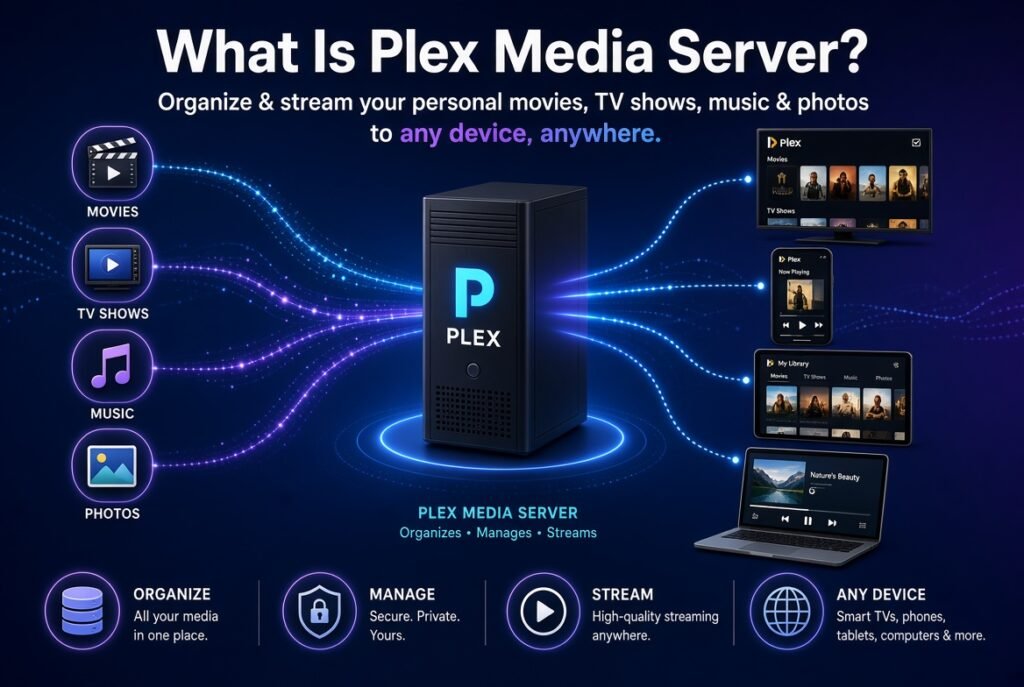
Plex Media Server is the central component of a personal Plex setup.
You install the server on a computer or compatible NAS and point it toward your media folders. Plex then analyzes the content and organizes it into libraries.
For example:
Your Movies
     ↓
Plex Media Server
     ↓
Plex Library
     ↓
Smart TV / Fire TV / Roku / Apple TV / Phone
This is one of the biggest differences between Plex and conventional IPTV players.
An IPTV player normally receives a playlist and plays streams, while Plex is primarily designed to organize and deliver media from a server.
Is Plex Free?
Yes, Plex has a substantial free component.
Plex states that its basic media-server functionality is free, including the Plex Media Server itself and playback of personal media under applicable conditions. Plex also provides ad-supported Movies & Shows and Live TV services.
However, some advanced features require a paid subscription.
For example, DVR recording is a premium feature requiring an active Plex Pass subscription.
So the answer to “Is Plex free?” is:
Yes, but not every Plex feature is free.
Is Plex Safe?
Plex itself is a mainstream media platform. However, your security also depends on how you configure your Plex Media Server and what external services or playlists you connect to it.
For a safer setup:
- Download Plex from official sources.
- Keep Plex Media Server updated.
- Use a strong account password.
- Enable appropriate account security features.
- Avoid unknown IPTV playlists.
- Do not enter credentials into suspicious websites.
- Be careful when exposing your Plex server to the internet.
- Only use IPTV streams and services you are legally entitled to access.
Plex’s official documentation also covers secure server connections and remote access configuration.
Is Plex an IPTV Player?
Not in the traditional sense.
This is one of the most important points for anyone searching for Plex IPTV player.
Apps such as TiviMate, IPTV Smarters, OTT Navigator, or other dedicated IPTV players are built around IPTV playlists and IPTV services.
Plex has a different architecture.
Its official Live TV/DVR functionality is based on compatible tuners and antennas connected to Plex Media Server. Plex then makes that live-TV source available through supported Plex applications.
Therefore:
Plex is a media server and streaming platform with Live TV/DVR functionality, not a conventional M3U/Xtream Codes IPTV player.
Does Plex Support IPTV?
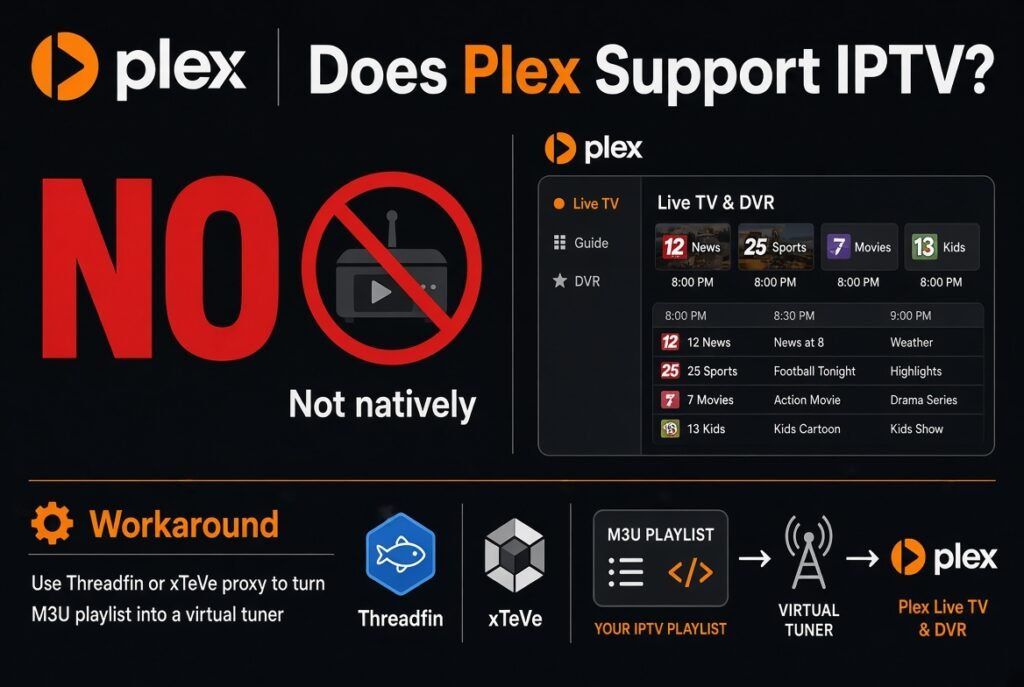
The answer requires some clarification.
Direct IPTV support
Plex does not provide the typical IPTV-player experience where you simply enter:
- M3U URL
- Xtream Codes username
- Xtream Codes password
- Portal URL
into Plex and immediately receive an IPTV channel list.
Instead, Plex’s official Live TV/DVR functionality works with compatible tuner hardware and antennas.
IPTV through an intermediary
There is another possibility.
Tools such as xTeVe and Threadfin can work as intermediary services that convert/manage M3U and XMLTV sources and expose them to Plex as a tuner/DVR-style source. xTeVe describes itself specifically as an M3U proxy for Plex DVR and Emby Live TV.
This creates a setup like:
IPTV M3U Playlist
        ↓
   xTeVe / Threadfin
        ↓
  Virtual / Emulated Tuner
        ↓
   Plex Media Server
        ↓
     Plex Apps
        ↓
 Smart TV / Fire TV / Roku / Apple TV
This is the main concept behind Plex IPTV integration.
How to Add IPTV to Plex
If you want to explore adding IPTV to Plex, the process is considerably different from adding IPTV to TiviMate.
A typical third-party architecture looks like this:
Step 1: Obtain a legitimate IPTV source
You need a legal IPTV stream source that provides an M3U playlist and, ideally, EPG/XMLTV data.
Do not use unauthorized playlists or streams.
Step 2: Install an intermediary
Common solutions include:
- xTeVe
- Threadfin
xTeVe supports external M3U files, XMLTV files, channel filtering, channel mapping, stream buffering, and Plex/Emby EPG compatibility.
Threadfin is another M3U proxy designed for Plex DVR as well as Emby and Jellyfin Live TV.
Step 3: Add your M3U playlist
The intermediary can process the M3U source.
For example:
M3U Playlist
      ↓
xTeVe / Threadfin
      ↓
Channel filtering
      ↓
Channel mapping
      ↓
Plex-compatible tuner source
Step 4: Configure EPG
If your IPTV source provides XMLTV data, the intermediary can associate EPG information with channels.
This is particularly important if you want a cleaner Plex IPTV EPG experience.
Step 5: Configure Plex DVR
Plex then sees the intermediary as a compatible tuner/DVR source.
Plex’s Live TV/DVR system requires a compatible tuner and supports guide information associated with the DVR configuration.
Step 6: Open Plex on your device
Once configured correctly, you can access the resulting Live TV source through supported Plex applications.
Plex IPTV M3U: Does It Work?
This is one of the most commonly misunderstood topics.
Can Plex directly load an M3U file?
Not as a normal IPTV player would.
Plex does not simply offer an “Add M3U Playlist” button where you paste an IPTV playlist URL and automatically receive an IPTV guide.
However, an intermediary such as xTeVe can process external M3U files and provide a Plex-compatible tuner workflow. xTeVe’s documentation explicitly describes M3U playlist input and Plex DVR integration.
Therefore:
Plex + M3U directly: ❌
Plex + M3U through a compatible intermediary: ✅ Possible
Plex IPTV M3U Support Explained
The easiest way to understand it is to compare the two systems.
Traditional IPTV player
M3U URL
   ↓
IPTV Player
   ↓
Channels
   ↓
EPG
Plex IPTV setup
M3U
 ↓
xTeVe / Threadfin
 ↓
Tuner-style interface
 ↓
Plex DVR
 ↓
Plex Media Server
 ↓
Plex App
This additional layer is why Plex IPTV setup can be more complicated than using a dedicated IPTV player.
Can You Add IPTV M3U to Plex?
Yes, indirectly.
If you search for:
- add IPTV M3U to Plex
- Plex IPTV M3U
- Plex M3U playlist
- Plex M3U support
- add IPTV playlist to Plex
you will often encounter discussions involving xTeVe or Threadfin.
These tools are designed to bridge M3U-based sources with media servers.
xTeVe can merge external M3U files, process XMLTV data, filter channels, map channels, and export M3U/XMLTV data.
Plex IPTV Setup With xTeVe
xTeVe is one of the best-known tools for this type of integration.
Its project documentation identifies it as an M3U proxy for Plex DVR and Emby Live TV.
Basic architecture
IPTV Provider
      ↓
    M3U
      ↓
    xTeVe
      ↓
Channel Filtering
      ↓
Channel Mapping + EPG
      ↓
Plex DVR
      ↓
Plex Media Server
      ↓
Plex Client
xTeVe can also buffer HLS/M3U8 streams and manage the number of available tuners.
Why use xTeVe?
It can help with:
- M3U management
- XMLTV management
- Channel filtering
- Channel mapping
- Channel numbering
- Channel logos
- EPG mapping
- HLS/M3U8 buffering
- Plex DVR integration
Threadfin Plex IPTV Integration
Threadfin is another option worth knowing.
Threadfin describes itself as an M3U proxy for Plex DVR and Emby/Jellyfin Live TV and is based on xTeVe.
It supports features such as:
- External M3U playlists
- XMLTV
- Automatic playlist updates
- Channel filtering
- Channel mapping
- Channel categories
- HLS/M3U8 buffering
- Plex/Emby/Jellyfin EPG compatibility
For users who want to experiment with Plex IPTV integration, Threadfin is therefore an important tool to research.
Plex IPTV EPG: How Does It Work?
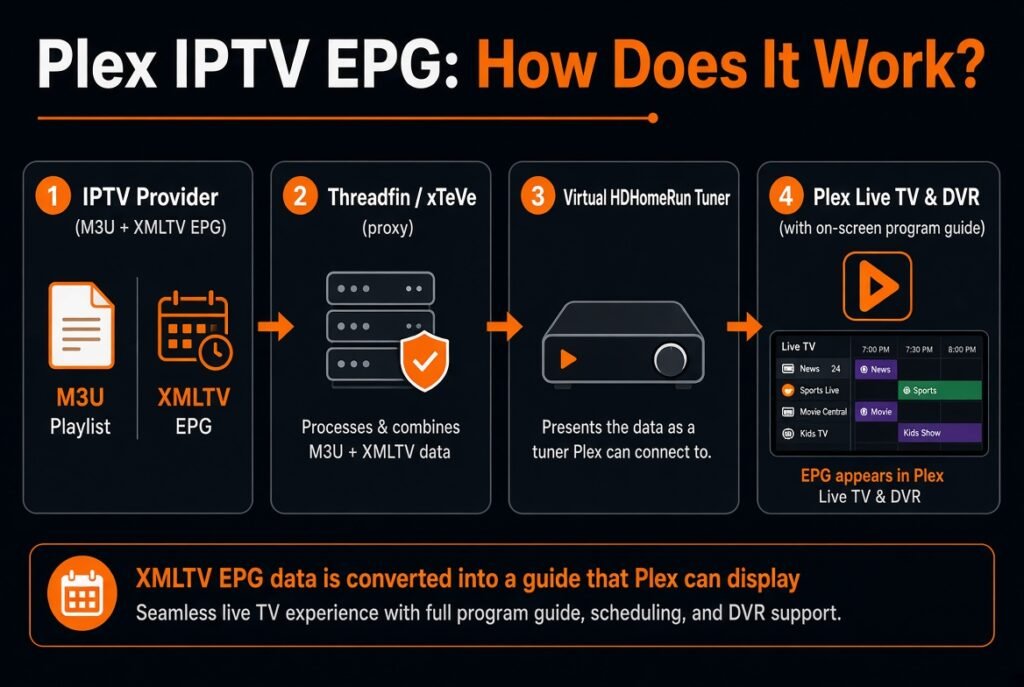
EPG means Electronic Program Guide.
It provides information such as:
- Program title
- Start time
- End time
- Program description
- Channel information
- Categories
In an IPTV environment, EPG information is commonly provided through XMLTV.
A simplified architecture is:
M3U
 ↓
Channel List

XMLTV
 ↓
Program Guide

Both
 ↓
xTeVe / Threadfin
 ↓
Plex
Plex officially supports guide data for its Live TV/DVR ecosystem, and its documentation also includes support for using XMLTV guide data in appropriate DVR configurations.
Plex IPTV Player vs Dedicated IPTV Player
This is where the choice becomes important.
| Feature | Plex | Dedicated IPTV Player |
|---|---|---|
| Personal media library | ✅ | Usually ❌ |
| Media server | ✅ | ❌ |
| Native M3U workflow | ❌ | ✅ |
| Xtream Codes login | ❌ | Often ✅ |
| IPTV-focused interface | ❌ | ✅ |
| EPG | ✅ with supported Live TV/DVR setups | Usually ✅ |
| DVR | ✅ | Depends on app |
| Movies/TV metadata | Excellent | Usually basic |
| Home media management | Excellent | Limited |
| IPTV setup simplicity | Moderate/complex | Usually easier |
If your primary goal is IPTV streaming, a dedicated IPTV player will generally be simpler.
If your goal is to build a complete personal media ecosystem, Plex is much more interesting.
Plex With IPTV: Advantages and Disadvantages
Advantages
Excellent media organization
Plex is particularly strong at organizing personal movies, TV shows, music, and photos.
Multi-device ecosystem
Plex has applications across many platforms, including Smart TVs, streaming devices, mobile devices, computers, and game consoles.
Attractive interface
Plex provides a polished interface for browsing libraries and Live TV sources.
EPG and DVR ecosystem
When configured with supported Live TV/DVR hardware or compatible intermediary solutions, Plex can provide a more traditional TV-style experience.
Remote access
Plex can provide remote access to personal media when configured appropriately.
Disadvantages
No simple M3U login
You cannot treat Plex like a standard IPTV player.
No native Xtream Codes interface
There is no standard Plex field where you enter:
Server URL
Username
Password
as you would in many IPTV apps.
IPTV integration can be complicated
Using xTeVe or Threadfin introduces additional configuration.
Server requirements
Your Plex Media Server needs to be capable of handling your streaming workload. Plex notes that Live TV playback may require transcoding capability.
Plex IPTV Service: What Does Plex Actually Provide?
This is another area where search intent can be confusing.
Plex itself provides free, ad-supported Live TV in supported regions. This is a Plex service and is separate from connecting your own external IPTV source.
Plex also supports Live TV through its DVR ecosystem when you connect compatible tuner hardware and an antenna.
Therefore, Plex IPTV service should not automatically be interpreted as “Plex sells IPTV subscriptions.”
It doesn’t work like a conventional third-party IPTV provider.
Plex Live TV vs IPTV
These concepts are related but not identical.
Plex Live TV
Plex provides its own free ad-supported Live TV service and also supports tuner-based Live TV/DVR functionality.
IPTV
IPTV generally refers to television delivered through IP networks.
An IPTV provider may supply:
- M3U
- M3U8
- XMLTV
- Stream URLs
- Other authentication methods
Plex does not natively turn into a traditional IPTV player simply because you have an M3U playlist.
How to Add an IPTV Playlist to Plex: What You Need
For an advanced setup, you may need:
- A legitimate IPTV/M3U source
- XMLTV/EPG data if available
- Plex Media Server
- Plex-compatible client
- xTeVe or Threadfin
- Network connectivity
- Sufficient server resources
The intermediary is important because it bridges the difference between an IPTV playlist and Plex’s tuner/DVR model.
Plex IPTV Troubleshooting
If your Plex IPTV setup is not working, check these areas first.
1. The channel list is empty
Check whether your M3U playlist is valid and whether the intermediary successfully imported it.
2. EPG is missing
Check:
- XMLTV URL
- Channel IDs
tvg-id- XMLTV channel IDs
- Mapping configuration
xTeVe’s documentation explains that channel mapping can associate M3U channel identifiers with XMLTV data.
3. Plex sees the tuner but channels don’t play
The stream format may be incompatible.
xTeVe’s troubleshooting documentation notes that Plex DVR may encounter compatibility problems with some streaming formats and codecs.
4. Playback constantly buffers
Possible causes include:
- Slow IPTV source
- Weak network connection
- Server limitations
- Transcoding load
- Incompatible codec
- Too many simultaneous streams
5. Some channels work and others don’t
This often indicates differences between the individual streams rather than a problem with Plex itself.
Plex IPTV vs Jellyfin
Jellyfin vs Plex is another popular search topic.
Both are media-server platforms, but they have different philosophies and ecosystems.
Plex focuses heavily on a polished consumer experience and broad ecosystem support, while Jellyfin is an open-source media-server project.
For IPTV users, both platforms can be extended with tools such as Threadfin, which supports Plex, Jellyfin, and Emby Live TV workflows.
Which is better?
For a polished mainstream experience:
Plex
For users who prioritize open-source control:
Jellyfin
For IPTV specifically, your choice may depend more on the intermediary and your technical requirements than on the media server alone.
Plex Login and Account Setup
To use Plex services, you generally create or sign into a Plex account.
The account connects your Plex applications and server ecosystem.
A typical setup looks like:
Plex Account
      ↓
Plex Media Server
      ↓
Libraries / Live TV
      ↓
Plex Apps
If you are setting up Plex for the first time, start with the official Plex documentation rather than downloading modified versions from third-party websites.
Is Plex Worth Using for IPTV?
It depends entirely on your objective.
Choose Plex if you want:
- Personal media management
- Movies and TV libraries
- Music organization
- Multi-device streaming
- A polished interface
- Live TV/DVR functionality
- Advanced home-media management
Consider a dedicated IPTV player if you primarily want:
- M3U playlists
- Xtream Codes
- Simple IPTV setup
- IPTV-focused EPG
- Fast channel navigation
- Minimal configuration
For a pure IPTV experience, Plex can be more complicated than necessary.
For a complete home media system, however, Plex can be an excellent choice.
Important: IPTV Legality and Safety
An M3U playlist is simply a method of describing media streams. The legality of the streams depends on their source and your rights to access them.
Before adding IPTV to Plex:
- Use authorized services.
- Avoid pirated streams.
- Do not share copyrighted streams without permission.
- Protect your IPTV credentials.
- Avoid suspicious playlist URLs.
- Keep your Plex server updated.
Plex itself does not provide a license for third-party IPTV content.
Frequently Asked Questions About Plex IPTV
Can Plex play IPTV?
Yes, but not in the same way as a traditional IPTV player. Plex’s official Live TV/DVR system uses compatible tuners, while tools such as xTeVe or Threadfin can bridge M3U/XMLTV sources into a Plex DVR workflow.
Does Plex support M3U?
Not as a native IPTV playlist player. An intermediary such as xTeVe can process M3U playlists and expose them to Plex through a tuner/DVR-style setup.
Can I add IPTV M3U to Plex?
Indirectly, yes. A tool such as xTeVe or Threadfin can be used as a bridge.
Does Plex support Xtream Codes?
Plex does not provide a native Xtream Codes login interface. You cannot simply enter Xtream Codes credentials into Plex like you can in many dedicated IPTV applications.
Does Plex support EPG?
Yes, in its Live TV/DVR ecosystem. Plex supports program-guide data, and XMLTV can also be used in supported DVR configurations.
Is Plex an IPTV player?
Not primarily. Plex is a media-server and streaming platform with Live TV/DVR functionality.
Is Plex free?
Yes, many core Plex features are free, including Plex Media Server and certain free streaming services. Some premium features, including DVR recording, require Plex Pass.
What is Plex Media Server?
It is the server software that stores, organizes, and streams your personal media to Plex applications.
What is xTeVe?
xTeVe is an M3U proxy designed to integrate playlist-based sources with Plex DVR and other compatible media-server platforms.
What is Threadfin?
Threadfin is an M3U proxy based on xTeVe that supports Plex DVR and also Emby/Jellyfin Live TV workflows.
Plex vs Jellyfin: which is better?
There is no universal winner. Plex is attractive for its polished ecosystem and ease of use, while Jellyfin is particularly appealing to users who prefer an open-source approach.
Final Verdict: Is Plex Good for IPTV?
Plex is powerful, but it is not the easiest IPTV player.
If you simply want to paste an M3U URL or Xtream Codes credentials and start watching IPTV, a dedicated IPTV player is usually the better option.
But if you want to combine IPTV-style Live TV with a powerful personal media server, metadata management, multi-device access, and a polished interface, Plex can be a very interesting solution when used with an appropriate intermediary such as xTeVe or Threadfin.


