
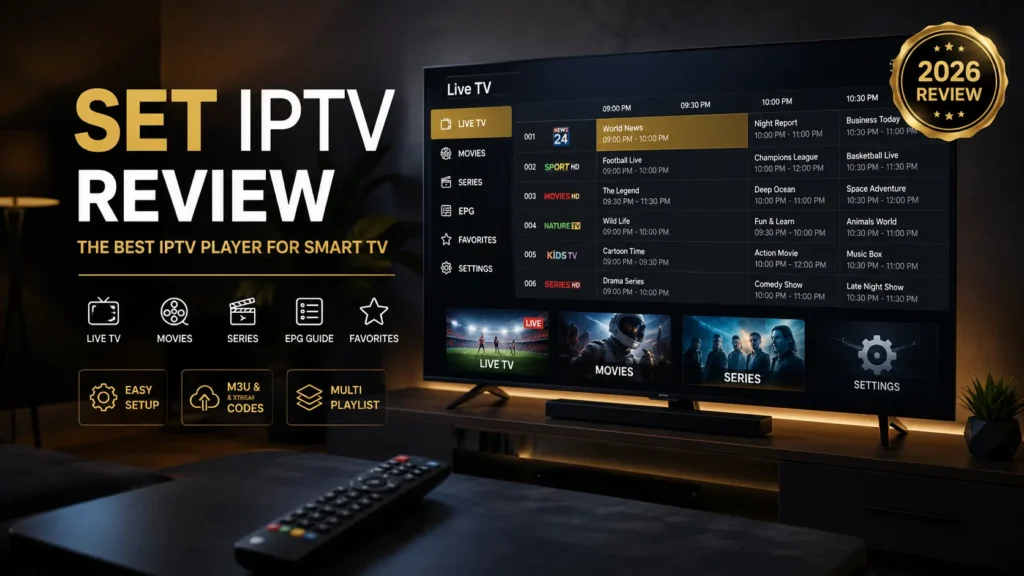
If you’re looking for an IPTV player for your Samsung Smart TV, LG WebOS TV, Firestick, Android TV, or Google TV, you’ve probably heard about SET IPTV.
In this SET IPTV Review, we’ll explain what SET IPTV is, its features, installation process, activation, supported devices, pricing, and compare it with other popular IPTV players such as IPTV Smarters Pro, TiviMate, Duplex IPTV, SmartOne IPTV, Smart IPTV, and IBO Player Pro.
Note: SET IPTV is an IPTV player only. It does not provide live TV channels or an IPTV subscription. You’ll need your own IPTV provider to stream content.
What Is SET IPTV?
SET IPTV is a premium IPTV player designed primarily for Smart TVs and Android-based devices. It allows users to stream live TV, movies, and series by adding their own IPTV playlists.
The app supports:
- M3U Playlist URLs
- Xtream Codes API
- Electronic Program Guide (EPG)
- Multiple playlists
- Favorites
- Catch-up TV (provider dependent)
It is particularly popular among Samsung and LG Smart TV users because of its clean interface and simple activation process.
SET IPTV Features
SET IPTV offers a wide range of useful IPTV features.
Main Features
- Live TV streaming
- Movies & TV Series
- Electronic Program Guide (EPG)
- Favorites management
- Subtitle support
- Parental controls
- Catch-up TV
- Recording support (provider/device dependent)
- Multi-playlist support
- Xtream Codes API
- M3U Playlist support
- Fast channel switching
- Modern Smart TV interface
SET IPTV Interface
The SET IPTV interface is designed for television screens and remote controls.
Users can easily:
- Browse Live TV
- Watch Movies & Series
- Organize Favorites
- View TV schedules
- Search channels
- Manage playlists
Its clean layout makes navigation smooth even for beginners.
SET IPTV EPG
SET IPTV fully supports Electronic Program Guide (EPG).
The TV Guide displays:
- Current programs
- Upcoming shows
- Channel schedules
- Program descriptions
A properly configured EPG makes browsing channels much easier.
SET IPTV Favorites
You can create a personalized Favorites list to quickly access your most-watched channels.
SET IPTV Subtitles
SET IPTV supports subtitles for compatible live streams and video-on-demand content.
SET IPTV Parental Control
Parents can restrict access to selected content using built-in parental control options.
SET IPTV Catch-up
If your IPTV provider offers Catch-up TV, SET IPTV can display previously aired programs directly from the TV Guide.
SET IPTV Recording
Recording support depends on your IPTV provider and the device you’re using.
SET IPTV Multi Playlist
SET IPTV allows users to manage multiple IPTV accounts simultaneously.
Supported playlist types include:
- M3U Playlist
- Xtream Codes API
SET IPTV External Player
On supported devices, SET IPTV can work with compatible external video players for additional playback options.
SET IPTV Price & Cost
One of the most common questions is:
How much does SET IPTV cost?
SET IPTV usually offers a free trial for new installations. After the trial period ends, users must purchase a device license to continue using the application.
Prices may change, so it’s recommended to check the official SET IPTV website for the latest activation fee.
SET IPTV Lifetime License
SET IPTV generally uses a one-time device activation license rather than a monthly subscription.
The license is linked to your TV or streaming device.
SET IPTV Subscription
Buying a SET IPTV license does not include IPTV channels.
You still need an IPTV subscription from a provider.
SET IPTV Premium
After activation, you can use all available player functions included with your licensed version.
SET IPTV Free Trial
Most users can try the application before purchasing a license.
Supported Devices
SET IPTV supports many popular devices, including:
- Samsung Smart TV (Tizen)
- LG Smart TV (WebOS)
- Android TV
- Firestick
- Fire TV
- Google TV
- Chromecast
- Android TV Box
- Philips Smart TV
- Sony Smart TV
How to Install SET IPTV
Installing SET IPTV is simple.
Step 1
Download SET IPTV from your device’s app store or install it on your compatible device.
Step 2
Launch the application.
Step 3
Write down your Device MAC Address if requested.
Step 4
Activate the application.
SET IPTV Activation Guide
To activate SET IPTV:
- Open the application.
- Copy your TV’s MAC Address.
- Visit the official activation portal.
- Purchase a license if your trial has expired.
- Restart the application.
SET IPTV Login
SET IPTV supports two common login methods:
- Xtream Codes API
- M3U Playlist URL
SET IPTV Xtream Codes Setup
Enter:
- Server URL
- Username
- Password
Save your information and reload the application.
How to Add M3U Playlist to SET IPTV
Adding your IPTV playlist is easy.
- Open SET IPTV.
- Copy your Device MAC Address.
- Visit the playlist upload portal.
- Paste your M3U Playlist URL.
- Upload your playlist.
- Restart the app.
Your Live TV, Movies, and Series will appear automatically.
SET IPTV Samsung TV
SET IPTV is widely used on Samsung Smart TVs (Tizen OS) because it offers excellent performance and easy playlist management.
SET IPTV LG WebOS
LG Smart TV users can install SET IPTV directly from the LG Content Store on supported models.
SET IPTV Firestick
SET IPTV can also be installed on Firestick, providing smooth playback and remote-friendly navigation.
SET IPTV Android TV
Android TV users benefit from:
- Fast navigation
- Excellent EPG
- Easy playlist management
- Stable playback
SET IPTV vs IPTV Smarters Pro
| Feature | SET IPTV | IPTV Smarters Pro |
|---|---|---|
| Samsung TV | ✅ | ✅ |
| LG TV | ✅ | ✅ |
| Firestick | ✅ | ✅ |
| Android TV | ✅ | ✅ |
| M3U Playlist | ✅ | ✅ |
| Xtream Codes | ✅ | ✅ |
| EPG | ✅ | ✅ |
Choose SET IPTV if your primary device is a Smart TV.
Choose IPTV Smarters Pro if you need wider platform compatibility, including Windows and macOS.
SET IPTV vs TiviMate
TiviMate excels on Android TV and Firestick with extensive customization options, while SET IPTV is a great option for Samsung and LG Smart TVs thanks to its TV-optimized interface.
SET IPTV vs IBO Player Pro
Both are IPTV players with Smart TV support.
- SET IPTV offers a simple interface and straightforward activation.
- IBO Player Pro provides its own interface, licensing model, and feature set.
The better choice depends on your preferred platform and user experience.
SET IPTV vs SmartOne IPTV
SET IPTV and SmartOne IPTV are both popular on Smart TVs. SET IPTV is appreciated for its easy setup and playlist management.
SET IPTV vs Duplex IPTV
Both applications support M3U playlists, Xtream Codes, and EPG. Duplex IPTV focuses on multi-playlist management, while SET IPTV emphasizes simplicity and Smart TV compatibility.
SET IPTV vs Smart IPTV
SET IPTV provides a more modern interface and supports many of the same IPTV playlist formats as Smart IPTV.
Pros and Cons
Pros
- Excellent Smart TV compatibility
- Easy activation
- Modern interface
- M3U & Xtream Codes support
- EPG support
- Favorites management
- Subtitle support
- Multi-playlist support
- Smooth HD & 4K playback
Cons
- IPTV subscription not included
- Paid license after the trial period
- Recording depends on the IPTV provider
Final Verdict
SET IPTV is one of the best IPTV players for Samsung Smart TVs, LG WebOS TVs, Firestick, Android TV, Philips TVs, and Sony TVs. It combines a clean interface, reliable performance, EPG support, and straightforward activation, making it a solid choice for users who want a dedicated Smart TV IPTV player.
Frequently Asked Questions (FAQ)
What is SET IPTV?
SET IPTV is an IPTV player that allows you to stream live TV, movies, and series using your own IPTV subscription via M3U playlists or Xtream Codes.
Is SET IPTV free?
Most users receive a free trial. After the trial period ends, a one-time device activation license is typically required.
Does SET IPTV include IPTV channels?
No. SET IPTV is only a player and does not include channels or IPTV subscriptions.
How do I activate SET IPTV?
Open the app, copy your device’s MAC Address, visit the official activation portal, complete the activation, and restart the app.
How do I add an M3U playlist to SET IPTV?
Upload your M3U Playlist URL through the SET IPTV playlist upload portal using your device’s MAC Address, then restart the application.
Does SET IPTV support Xtream Codes?
Yes. SET IPTV supports both Xtream Codes API and M3U Playlist URLs.
Can I install SET IPTV on Samsung Smart TV?
Yes. SET IPTV is compatible with many Samsung Smart TVs running the Tizen operating system.
Does SET IPTV work on LG WebOS?
Yes. It supports many LG Smart TVs with WebOS.
Which is better: SET IPTV or TiviMate?
If you mainly use Samsung or LG Smart TVs, SET IPTV is an excellent choice. For Android TV and Firestick users who want advanced customization, TiviMate may be the better option.


