
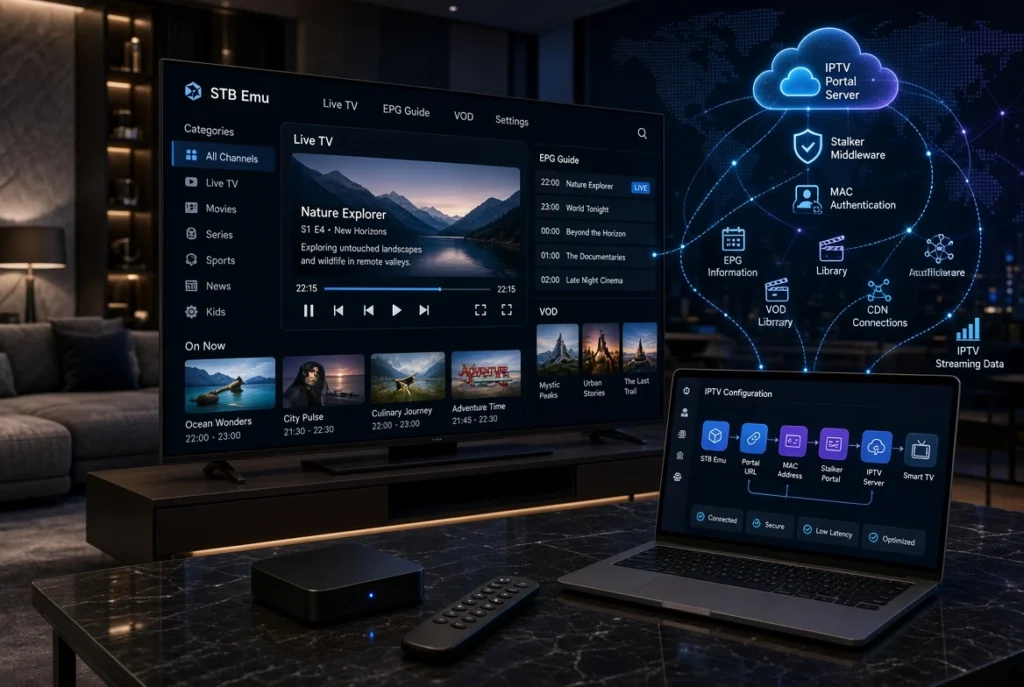
The IPTV industry has introduced many different ways to watch online television, from M3U playlists and Xtream Codes to advanced portal-based systems. Among the applications designed for IPTV users, STB Emu IPTV has become a popular choice for people who want a traditional MAG box experience without purchasing a physical set-top box.
STB Emu (STB Emulator) allows Android devices to simulate a MAG IPTV receiver by connecting to IPTV services through a Portal URL, MAC Address authentication, and Stalker Portal technology. It is especially popular among users who are familiar with MAG devices and want a similar interface on their Android TV Box, Firestick, or Android devices.
Many beginners search for answers to questions such as:
- What is STB Emu IPTV?
- How to setup STB Emu?
- How to add Portal URL to STB Emu?
- How does STB Emulator work?
- What is the difference between STB Emu, M3U, and Xtream Codes?
This complete guide explains everything you need to know about STB Emu IPTV, including installation, configuration, supported devices, troubleshooting, and best practices for a better streaming experience.
Important: STB Emu is only an IPTV player/emulator. It does not provide IPTV channels or subscriptions. You need your own IPTV service and valid connection information.
What Is STB Emu IPTV?

STB Emu IPTV is an application that emulates a traditional IPTV set-top box (STB), especially MAG devices.
STB Emu creates a virtual IPTV receiver environment similar to devices such as:
- MAG 250
- MAG 254
- MAG 256
- MAG 322
- MAG 324
Instead of using a physical MAG receiver, users can install STB Emu on compatible Android devices and connect to IPTV portal servers.
The application is mainly designed for IPTV services using:
- Portal URL
- Stalker Middleware
- MAC Address authentication
Unlike IPTV apps based on playlists, STB Emu focuses on reproducing the MAG-style IPTV experience.
How Does STB Emu IPTV Work?

The STB Emu connection process is different from standard IPTV applications.
The basic structure is:
IPTV Provider → Portal Server → STB Emu → Android Device → TV Screen
When configured correctly:
- STB Emu creates a virtual set-top box profile.
- The app connects to the IPTV portal server.
- The server identifies the device using its MAC address.
- IPTV content information is loaded.
- The user can access the IPTV interface.
STB Emu profiles allow users to configure different portal connections, including Portal URL settings and media player options.
STB Emu Main Features
MAG Box Style Interface
One of the biggest advantages of STB Emu is its familiar IPTV receiver interface.
Users can access features similar to MAG devices:
- Live TV categories
- Channel lists
- Electronic Program Guide (EPG)
- VOD sections
- TV archive (depending on service support)
Portal URL Support
STB Emu mainly works through an IPTV Portal URL.
A Portal URL connects the application to the IPTV middleware server.
Example structure:
http://portal-address.com/c/The exact Portal URL depends on the IPTV service configuration.
MAC Address Authentication
Many Stalker Portal systems identify devices using a MAC address.
STB Emu provides a virtual MAC address that can be associated with an IPTV account.
The activation process generally requires:
- Portal URL
- MAC Address
- Compatible IPTV service
IPTV EPG Support
With compatible IPTV services, STB Emu can display:
- Channel schedules
- Program information
- Current programs
- Upcoming programs
This creates a more traditional TV experience.
How To Setup STB Emu IPTV
Requirements Before Setup
Before configuring STB Emu, you need:
1. STB Emu Application
Available for compatible Android-based devices.
2. IPTV Portal Information
Usually provided by your IPTV service:
- Portal URL
- MAC activation details
3. Stable Internet Connection
A reliable connection improves streaming quality.
Step-by-Step STB Emu Setup Guide
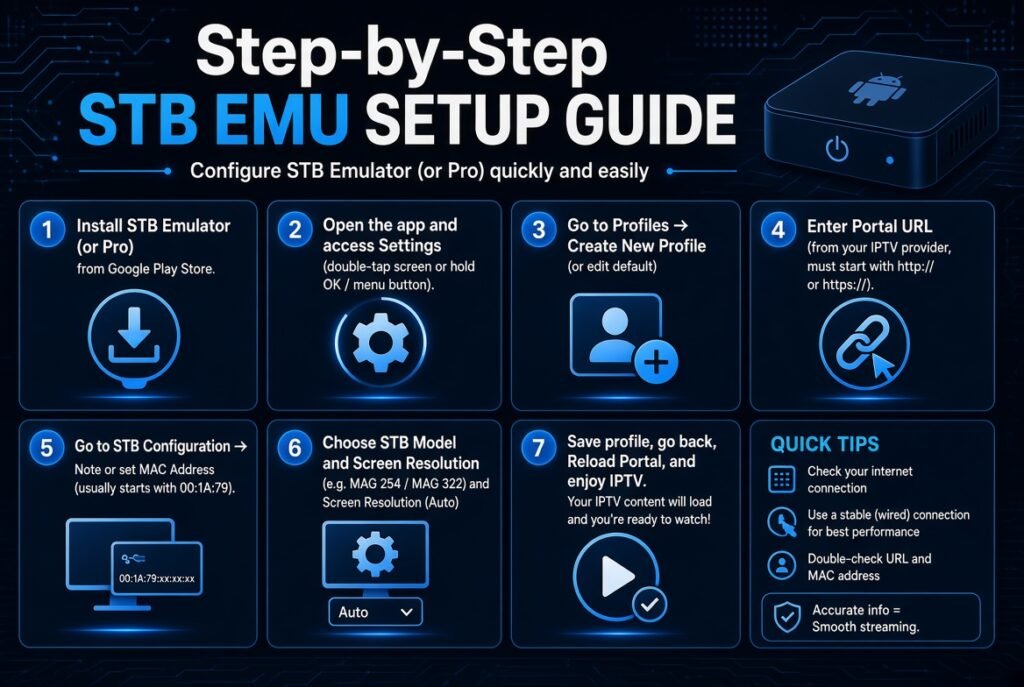
Step 1: Install STB Emu
Install the STB Emu application on your compatible Android device.
Supported platforms include:
- Android TV Box
- Android Smartphone
- Android Tablet
- Fire TV devices
Step 2: Open Settings
Launch STB Emu.
Open:
Settings → Profiles
You can create a new profile or modify the default one.
Step 3: Create IPTV Profile
Select:
Add Profile
Then enter a profile name.
Example:
My IPTV ServiceThe profile name is only for organization.
Step 4: Add Portal URL
Go to:
Profile Settings → Portal Settings → Portal URL
Enter your IPTV Portal URL carefully.
Make sure:
- No spaces are added
- The address is correct
- The URL format matches your IPTV service
Step 5: Find MAC Address
Navigate to:
STB Configuration → MAC Address
Copy the displayed MAC address.
Your IPTV service may require this address for activation.
Step 6: Restart STB Emu
After saving settings:
- Close the application
- Open STB Emu again
- Wait for the portal to load
If everything is configured correctly, the IPTV interface should appear.
STB Emu Supported Devices
STB Emu Android TV
Android TV is one of the most common platforms for STB Emu.
Examples:
- Android TV Box
- Google TV devices
- NVIDIA Shield
- Xiaomi TV Box
STB Emu Firestick
Many Fire TV users use STB Emu because Firestick devices are Android-based.
Common devices:
- Fire TV Stick
- Fire TV Stick 4K
- Fire TV Cube
STB Emu Android Box
Android boxes are popular because they provide:
- Better storage
- Ethernet support
- More customization options
STB Emu Smart TV
Compatibility depends on the operating system.
| Device | Compatibility |
|---|---|
| Android TV | ✅ Supported |
| Google TV | ✅ Supported |
| Samsung Tizen | Limited |
| LG WebOS | Limited |
| Roku | Not supported |
STB Emu vs M3U IPTV
Many IPTV users compare STB Emu with M3U playlist-based players.
STB Emu
Uses:
- Portal URL
- MAC Address
- Stalker Middleware
Best for:
- MAG-style IPTV users
- Portal-based services
M3U IPTV
Uses:
- M3U Playlist URL
- M3U File
Common apps:
- TiviMate
- IPTV Smarters
- VLC
- Kodi
Comparison Table
| Feature | STB Emu | M3U IPTV |
|---|---|---|
| Connection | Portal URL | Playlist URL |
| Authentication | MAC Address | Username/Password |
| Interface | MAG Style | IPTV App Style |
| Setup | Medium | Easy |
| EPG | Supported | Supported |
STB Emu vs Xtream Codes
Xtream Codes IPTV
Uses:
- Server URL
- Username
- Password
Popular with:
- IPTV Smarters
- TiviMate
- XCIPTV
STB Emu
Uses:
- Portal URL
- MAC Address
The best choice depends on your IPTV provider’s connection method.
Common STB Emu Problems and Solutions
STB Emu Portal Not Working
Possible causes:
- Incorrect Portal URL
- MAC address not activated
- Server issue
Solutions:
- Verify Portal URL
- Check activation status
- Restart application
STB Emu Loading Forever
Possible reasons:
- Slow connection
- Portal server overload
- Incorrect settings
Try:
- Restart router
- Restart STB Emu
- Check portal information
STB Emu Connection Error
Check:
- Internet connection
- Portal URL spelling
- MAC address activation
STB Emu Buffering Problems
Buffering can happen because of:
- Weak Wi-Fi
- Server overload
- Device limitations
Solutions:
- Use Ethernet when possible
- Improve network stability
- Use a more powerful device
Advantages of STB Emu IPTV
✅ MAG box experience
✅ Simple portal-based connection
✅ Works on Android devices
✅ Supports IPTV middleware systems
✅ Familiar TV interface
✅ Good option for Stalker Portal users
Disadvantages of STB Emu
❌ Not ideal for M3U users
❌ Requires portal configuration
❌ Limited Smart TV support
❌ Setup can be confusing for beginners
Frequently Asked Questions About STB Emu IPTV
What is STB Emu?
STB Emu is an IPTV emulator that transforms compatible Android devices into a virtual MAG IPTV box.
Is STB Emu an IPTV service?
No. STB Emu is only a player. It requires your own IPTV service connection.
Does STB Emu support M3U?
STB Emu is mainly designed for Portal URL and Stalker-based IPTV systems.
Can I use STB Emu on Firestick?
Yes, STB Emu can work on many Android-based Fire TV devices.
What is STB Emu MAC Address?
It is the virtual device identifier used by some IPTV portal systems for authentication.
Is STB Emu better than IPTV Smarters?
It depends on your connection type.
- Portal URL → STB Emu is usually better.
- Xtream Codes/M3U → IPTV Smarters or TiviMate may be easier.
Final Thoughts
STB Emu IPTV remains one of the best solutions for users who want a MAG-style IPTV experience without purchasing dedicated hardware.
Its support for:
- Portal URL
- MAC authentication
- Stalker Portal
- IPTV middleware
- EPG
makes it a powerful choice for advanced IPTV users.
However, choosing the right IPTV player depends on your needs. If your IPTV service uses a Stalker Portal, STB Emu provides a familiar and reliable experience. For users who prefer M3U playlists or Xtream Codes, other IPTV applications may offer a simpler setup.


