
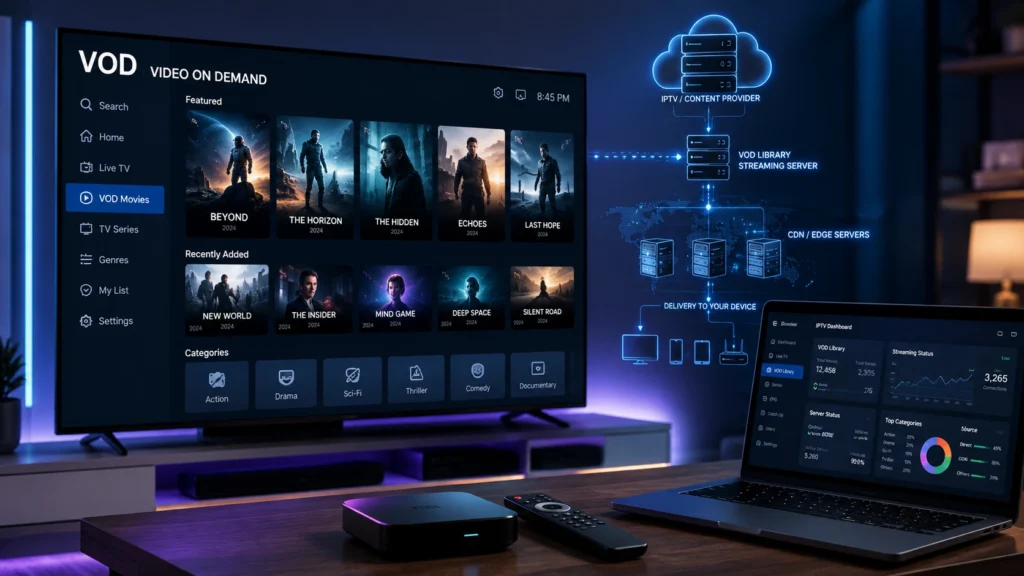
Video on Demand (VOD) has become one of the most important features of modern IPTV services. Unlike live TV, which requires viewers to watch content according to a scheduled broadcast, VOD allows users to choose content from a library and watch it whenever they want.
But what exactly is VOD in IPTV? How does IPTV VOD work? What is the difference between VOD and live TV? How do M3U playlists and Xtream Codes handle VOD content? And what should you do when IPTV VOD is not working, buffering, freezing, or failing to load?
This complete guide explains everything you need to know about IPTV VOD, including technology, playlists, players, devices, streaming quality, common problems, and practical troubleshooting solutions.
Important: IPTV players and VOD technology are tools for accessing content. Always use legitimate services and content that you are authorized to access.
What Does VOD Stand For?
VOD stands for Video on Demand.
Video on Demand is a streaming technology that allows users to select and watch video content whenever they want instead of following a fixed broadcasting schedule.
For example, with traditional live TV, a program starts at a specific time. With VOD, the viewer can select available content from a library and start playback immediately.
VOD is commonly used for:
- Movies
- TV series
- Documentaries
- Educational videos
- Entertainment content
- Recorded programs
- On-demand video libraries
In the IPTV environment, VOD is usually presented as a dedicated section inside an IPTV application or player.
What Is IPTV VOD?
IPTV VOD refers to Video on Demand content delivered through an IPTV platform.
An IPTV service can generally provide different types of content, including:
- Live TV
- Video on Demand
- TV series
- Catch-up content
- Electronic Program Guide (EPG)
The VOD section works differently from live streaming. Instead of continuously receiving a live broadcast, the user requests a specific video and the streaming system delivers it to the device.
This makes IPTV VOD particularly useful for people who prefer watching content according to their own schedule.
How Does IPTV VOD Work?
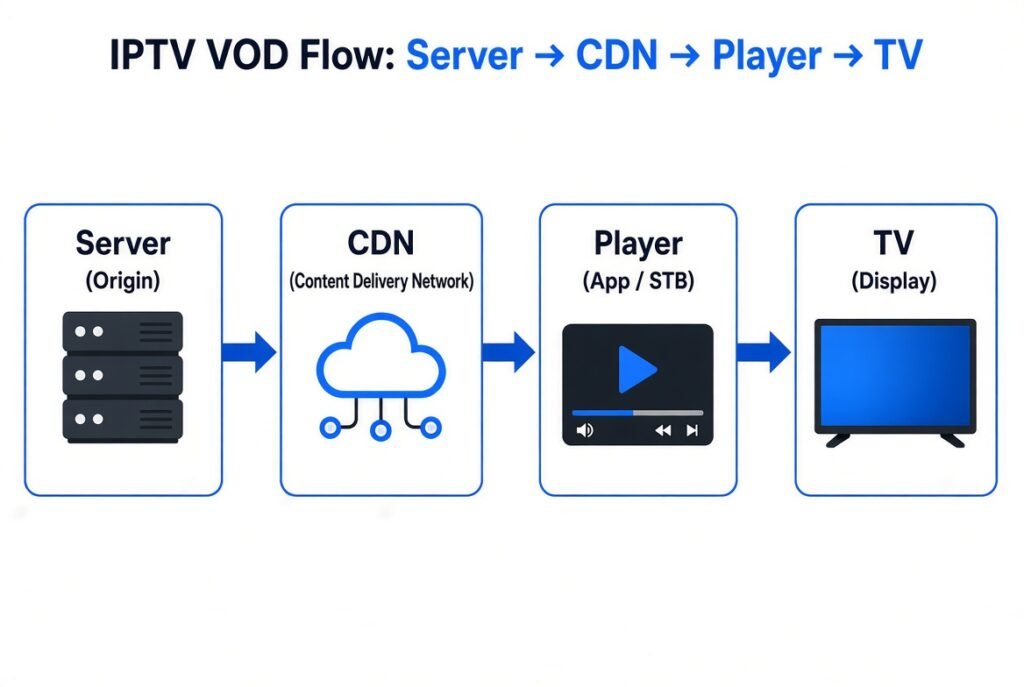
The basic IPTV VOD process involves several components.
1. VOD Content Server
Video files are stored and managed on a media or VOD server.
2. Streaming Infrastructure
When a user selects a video, the server prepares the content for delivery.
3. CDN and Edge Servers
A Content Delivery Network (CDN) can distribute content through geographically closer edge servers. This can improve scalability and reduce latency.
4. Streaming Protocol
Technologies such as HLS and MPEG-DASH can be used to deliver video efficiently over the internet.
5. IPTV Player
The IPTV application receives the stream and plays it on the user’s device.
The process can be simplified as:
VOD Library → Server → CDN/Network → IPTV Player → TV/Device
IPTV VOD vs Live TV
One of the most common questions is the difference between VOD and live IPTV.
| Feature | VOD | Live TV |
|---|---|---|
| Viewing time | Anytime | Scheduled |
| Content | On-demand library | Live broadcast |
| User control | High | Limited |
| Pause | Usually available | Depends on service |
| Rewatch | Usually possible | Depends on service |
| Streaming model | On-demand | Real-time |
| Main purpose | Movies & series | Live events & broadcasts |
Which Is Better?
Neither is universally better.
VOD is better when you want flexibility and on-demand viewing.
Live IPTV is better when you want real-time broadcasts, live events, or scheduled programming.
Many modern IPTV platforms combine both.
IPTV VOD Movies and Series
A typical IPTV VOD library may organize content into categories such as:
- Movies
- TV Shows
- Series
- Recently Added
- Popular Content
- Genres
- Languages
- Countries
- Years
- Favorites
A well-designed IPTV VOD library should make it easy to search, filter, and organize available content.
The quality of the VOD experience depends not only on the IPTV player but also on the provider’s servers, bandwidth, encoding, network architecture, and content delivery infrastructure.
What Is an IPTV VOD Player?
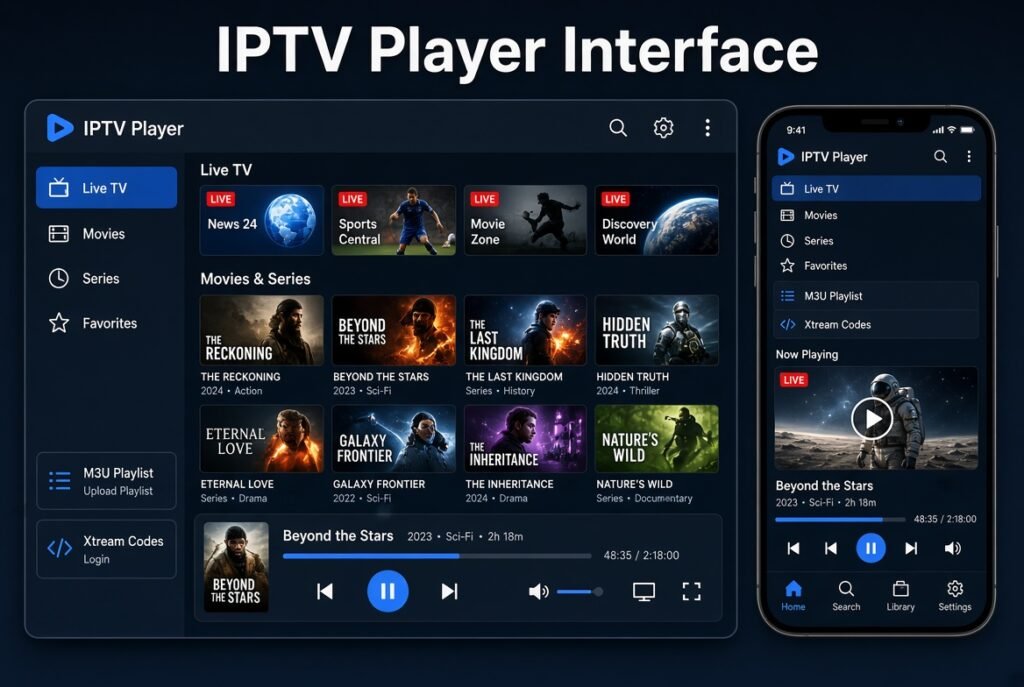
An IPTV VOD player is an application that allows users to play video streams and, depending on the application, access VOD libraries.
The player itself generally does not create the content.
Instead, it acts as an interface between the user and the IPTV service.
Depending on the application, IPTV players may support:
- Live TV
- VOD
- TV series
- M3U playlists
- Xtream Codes
- EPG
- Subtitles
- Multiple audio tracks
- Favorites
- Parental controls
- Playback controls
This is why it is important to distinguish between an IPTV player and an IPTV provider.
IPTV VOD With M3U Playlists
M3U is a playlist format commonly used to organize multimedia stream URLs.
An IPTV M3U playlist can contain information such as:
- Stream URLs
- Channel names
- Group categories
- Logos
- Metadata
Depending on the service and playlist structure, VOD entries may also be included.
A typical workflow looks like this:
M3U Playlist → IPTV Player → Available Content → VOD Playback
However, not every IPTV player handles M3U VOD content in exactly the same way.
If VOD content is missing from an M3U playlist, possible causes include:
- Incorrect playlist
- Unsupported format
- Expired URL
- Server problem
- Incorrect playlist configuration
- Player compatibility issue
IPTV VOD With Xtream Codes
Another common IPTV connection method is Xtream Codes API.
Instead of manually entering a large M3U playlist, compatible IPTV applications may allow users to enter information such as:
- Server URL
- Username
- Password
The application then retrieves available categories and content from the service.
Depending on the server configuration, this may include:
- Live content
- VOD
- Series
- EPG information
This can provide a more organized experience compared with manually managing a large playlist.
VOD and HLS Streaming
HLS (HTTP Live Streaming) is a widely used streaming technology developed by Apple.
HLS divides video into smaller segments that can be delivered over HTTP.
For VOD, this approach allows the player to request video segments progressively instead of downloading one large video file.
HLS can support:
- Adaptive bitrate streaming
- Multiple resolutions
- HD video
- 4K video
- Different network conditions
For example, a player can switch between different quality levels depending on available bandwidth.
VOD and MPEG-DASH
MPEG-DASH is another adaptive streaming technology.
Like HLS, MPEG-DASH can provide multiple versions of the same video at different bitrates and resolutions.
This is particularly useful when users have different internet speeds.
A streaming platform may provide:
1080p → 720p → 480p → 360p
The player can select an appropriate stream based on network conditions.
What Is VOD CDN?
A CDN for VOD is a Content Delivery Network designed to distribute video content efficiently.
Instead of every user requesting video directly from a single origin server, a CDN can distribute content through multiple edge locations.
This can help with:
- Scalability
- Traffic distribution
- Latency reduction
- Bandwidth management
- Faster content delivery
- Handling large numbers of simultaneous viewers
A CDN does not automatically fix every IPTV buffering problem, but properly designed content delivery infrastructure can significantly improve streaming performance.
Why Is IPTV VOD Buffering?
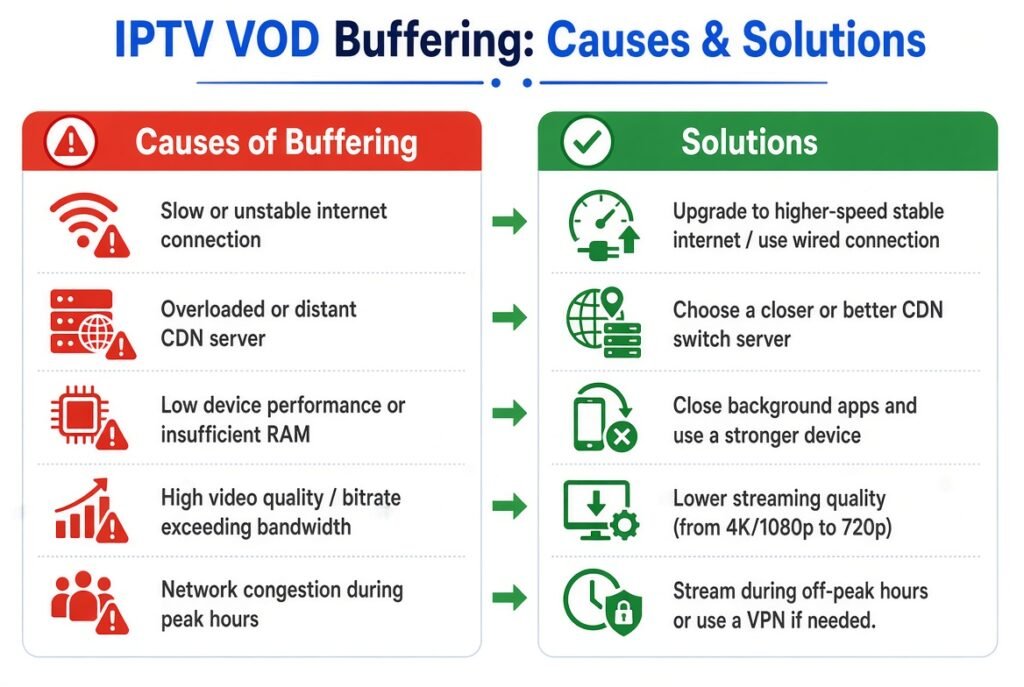
One of the most common complaints is:
“My IPTV VOD keeps buffering.”
Buffering can have many causes.
Common causes include:
- Slow internet connection
- Wi-Fi interference
- Network congestion
- Overloaded server
- High bitrate video
- Poor routing
- CDN issues
- Device limitations
- Outdated IPTV player
- Incorrect application settings
- ISP-related network problems
Importantly, buffering does not always mean that your internet connection is bad.
The problem may be on the server or network side.
How to Fix IPTV VOD Buffering
Try these steps in order.
1. Check Your Internet Connection
Run a speed test and make sure your connection is stable rather than simply fast.
2. Restart Your Router
Restarting your router can sometimes resolve temporary network problems.
3. Try Ethernet
If possible, connect your Smart TV, Android TV box, or streaming device using Ethernet.
A wired connection can be more stable than Wi-Fi.
4. Reduce Video Quality
If 4K VOD constantly buffers, test an HD or lower-quality stream.
Higher resolutions require more bandwidth.
5. Restart the IPTV Player
Completely close the application and open it again.
6. Clear the App Cache
On supported Android devices, clearing the application cache can resolve temporary playback problems.
7. Test Another VOD Title
If one video buffers while others play normally, the issue may be related to that particular stream.
8. Test Another Network
Try a different internet connection if possible.
This can help determine whether the problem is related to your local network.
IPTV VOD Not Working
If IPTV VOD is not working, check the following:
- Is live content working?
- Is the VOD category visible?
- Are individual titles loading?
- Does the player display an error?
- Is the playlist still valid?
- Are your credentials correct?
- Is the server online?
- Is your IPTV application updated?
If Live TV Works but VOD Does Not
This is an important clue.
If live streaming works normally but VOD does not, the problem may be related specifically to:
- VOD server
- VOD database
- VOD URL
- VOD authorization
- VOD configuration
- VOD content availability
In this situation, changing your entire internet connection may not solve the problem.
IPTV VOD Not Showing
Another common problem is:
“My IPTV VOD library is not showing.”
Possible causes include:
- The service does not include VOD.
- The VOD category is disabled.
- The playlist is incomplete.
- Xtream Codes information is incorrect.
- The IPTV player does not support the required format.
- The server is experiencing a temporary problem.
- The application needs to refresh its content.
Try refreshing the playlist or reconnecting the IPTV account.
IPTV VOD Keeps Loading
If the VOD section stays on a loading screen, check:
- Internet stability
- Server availability
- Application cache
- Playlist status
- DNS/network configuration
- IPTV player compatibility
- Device storage
- Server response time
If multiple devices experience the same problem simultaneously, the issue is more likely to be related to the service or server rather than one individual device.
IPTV VOD Playback Error
Playback errors can occur because of:
- Unsupported codec
- Incorrect stream format
- Expired URL
- Server-side configuration
- Player compatibility
- Network interruptions
- DRM restrictions
- Corrupted media segments
Updating the IPTV application and testing another compatible player can help identify the cause.
IPTV VOD on Firestick
Fire TV devices are commonly used for IPTV applications.
The general workflow is:
Install compatible IPTV player → Add authorized IPTV connection → Load content → Open VOD → Start playback
If VOD is buffering on Firestick:
- Restart the Firestick
- Check Wi-Fi signal
- Close background applications
- Clear the IPTV application’s cache
- Check available storage
- Test another quality level
- Update the application
IPTV VOD on Smart TV
Modern Smart TVs can also support IPTV applications depending on the operating system and available apps.
Common platforms include:
- Samsung Smart TV
- LG Smart TV
- Android TV
- Google TV
- Apple TV
The exact setup process varies between platforms and applications.
Before choosing an IPTV player, check whether it supports your device and your preferred connection method.
VOD on Android TV
Android TV provides a wide range of IPTV applications.
Depending on the player, you may be able to connect using:
- M3U
- Xtream Codes
- Portal-based connections
- Other supported playlist formats
After loading the authorized service, VOD content may appear as a dedicated category.
VOD Quality: HD, Full HD and 4K
VOD streaming quality depends on several factors.
HD
Lower bandwidth requirements and generally easier to stream.
Full HD
Provides a sharper picture but requires more bandwidth.
4K
Provides significantly higher resolution but requires:
- Compatible device
- Compatible display
- Sufficient bandwidth
- Appropriate bitrate
- Capable server infrastructure
A 4K label alone does not guarantee better playback. Encoding quality and bitrate also matter.
VOD Streaming Quality and Bitrate
Bitrate is one of the most important factors affecting video quality.
A higher bitrate can provide better image quality, but it also requires more bandwidth.
For example:
Higher bitrate → Better potential quality → Higher bandwidth requirement
This is why adaptive bitrate streaming is so important.
The player can switch between different versions depending on network conditions.
VOD vs SVOD, AVOD and TVOD
VOD is an umbrella concept with different business models.
SVOD
Subscription Video on Demand
Users pay a subscription to access content.
AVOD
Advertising Video on Demand
Content is supported by advertising.
TVOD
Transactional Video on Demand
Users pay for individual content or transactions.
PVOD
Premium Video on Demand
Premium content is offered through a paid on-demand model.
These models can coexist within the broader VOD ecosystem.
Common IPTV VOD Problems
Here is a quick troubleshooting table:
| Problem | Possible Cause | Recommended Action |
|---|---|---|
| VOD not showing | Playlist/server issue | Refresh connection |
| VOD buffering | Network/server | Test connection |
| VOD freezing | Network instability | Try Ethernet |
| VOD loading forever | Server timeout | Test another title |
| VOD playback error | Format/player | Try compatible player |
| VOD black screen | Stream/codec issue | Test another stream |
| No VOD category | Service configuration | Check account |
| VOD suddenly stopped | Server/content issue | Contact provider |
| VOD quality poor | Low bitrate | Test another quality |
| VOD works on one device only | Device/app issue | Test another player |
How to Get the Best IPTV VOD Experience
For a smoother experience, follow these recommendations:
Use a stable internet connection
Stability is often more important than maximum download speed.
Prefer Ethernet when possible
A wired connection can reduce Wi-Fi-related interruptions.
Keep your IPTV player updated
Updates can improve compatibility and playback.
Use a suitable device
Older hardware may struggle with high-resolution video.
Avoid unnecessary background applications
Freeing device resources can improve playback.
Choose appropriate video quality
Don’t force 4K if your connection or device cannot handle it.
Keep your playlist information private
Never publicly share IPTV usernames, passwords, portal addresses, or private playlist URLs.
IPTV VOD, EPG and XMLTV
VOD and EPG (Electronic Program Guide) serve different purposes.
EPG is mainly associated with scheduled programming and provides information such as:
- Program titles
- Start times
- End times
- Program descriptions
VOD is content that users select and watch on demand.
Therefore:
EPG = What is scheduled
VOD = What you choose to watch whenever you want
Both can exist within the same IPTV ecosystem.
IPTV VOD and CDN: Why Infrastructure Matters
A high-quality IPTV VOD experience depends on more than the IPTV application.
The complete infrastructure may include:
Content Storage → Origin Server → CDN → Edge Server → Internet → IPTV Player
Each component can influence performance.
If the origin server is overloaded, if the CDN is poorly configured, or if network routing is inefficient, users may experience:
- Buffering
- High latency
- Slow loading
- Playback interruptions
This is why IPTV streaming infrastructure and VOD content delivery are important parts of modern streaming technology.
Is VOD Better Than Live IPTV?
It depends on what you want to watch.
Choose VOD when you want:
- Flexible viewing
- Movies
- Series
- On-demand content
- Pause and resume
- Personal viewing schedules
Choose live IPTV when you want:
- Real-time programming
- Live events
- Scheduled broadcasts
- Real-time sports or entertainment
The best IPTV platforms can combine Live TV + VOD + Series + EPG in one interface.
Frequently Asked Questions About IPTV VOD
What is VOD in IPTV?
VOD in IPTV means Video on Demand, allowing users to select available video content and watch it whenever they want.
What does VOD stand for?
VOD stands for Video on Demand.
Does IPTV VOD include movies?
Depending on the service, an IPTV VOD library may contain movies, TV series, documentaries, and other on-demand content.
Why is IPTV VOD buffering?
Buffering can be caused by your internet connection, Wi-Fi, device, IPTV player, server, network routing, or CDN infrastructure.
Why is my IPTV VOD not showing?
The problem may be related to the playlist, account configuration, player compatibility, server, or the availability of VOD content.
Can I watch VOD on Firestick?
Yes, provided you use a compatible IPTV application and an authorized IPTV service that supports VOD.
Can I use VOD on Smart TV?
Yes. VOD can be available on compatible Smart TV IPTV applications depending on the operating system and service.
What is the difference between VOD and Live TV?
Live TV delivers real-time broadcasts, while VOD allows users to select content and watch it on demand.
What is VOD M3U?
VOD M3U generally refers to an M3U playlist containing on-demand video entries or URLs.
What is Xtream Codes VOD?
Compatible IPTV applications can use Xtream Codes API credentials to retrieve organized IPTV content, which may include VOD and series depending on the service.
Final Thoughts
VOD is one of the most important components of modern IPTV streaming. It gives users more control over what they watch and when they watch it, while technologies such as M3U, Xtream Codes, HLS, MPEG-DASH, CDN, adaptive bitrate streaming, and VOD servers work behind the scenes to deliver the content.
When IPTV VOD works poorly, the problem isn’t necessarily your internet connection. Server performance, network routing, application compatibility, video bitrate, CDN infrastructure, and device limitations can all affect playback.
Understanding these components makes it much easier to diagnose problems such as IPTV VOD buffering, VOD not working, VOD not showing, VOD loading forever, freezing, playback errors, and poor video quality.
For the best experience, use a reliable network, compatible IPTV player, capable streaming device, and legitimate IPTV service with properly configured VOD infrastructure.


